7 Aug, 2026
Headless Drupal vs Traditional Drupal: Which to Choose?

When it comes to architecture, Drupal gives you three paths: stay fully coupled, progressively decouple parts of the frontend, or go fully headless and split content from presentation completely. That one decision shapes your budget, your team structure, and how many screens your content can reach.
Get it wrong and you either overpay for flexibility nobody uses, or hit a wall the day marketing asks for a mobile app. This guide breaks down Headless Drupal vs Traditional Drupal debate, then ends with a decision framework. At Innoraft, we've built both models for enterprise clients, and neither is universally "better." The right choice depends on what you're building and who's building it.
What's the Real Difference Between Headless Drupal vs Traditional Drupal?
Traditional Drupal renders pages itself; decoupled and headless hand that job to a separate frontend and supply data. In case you are considering migrating to Drupal, here’s everything you need to know about traditional and headless Drupal.
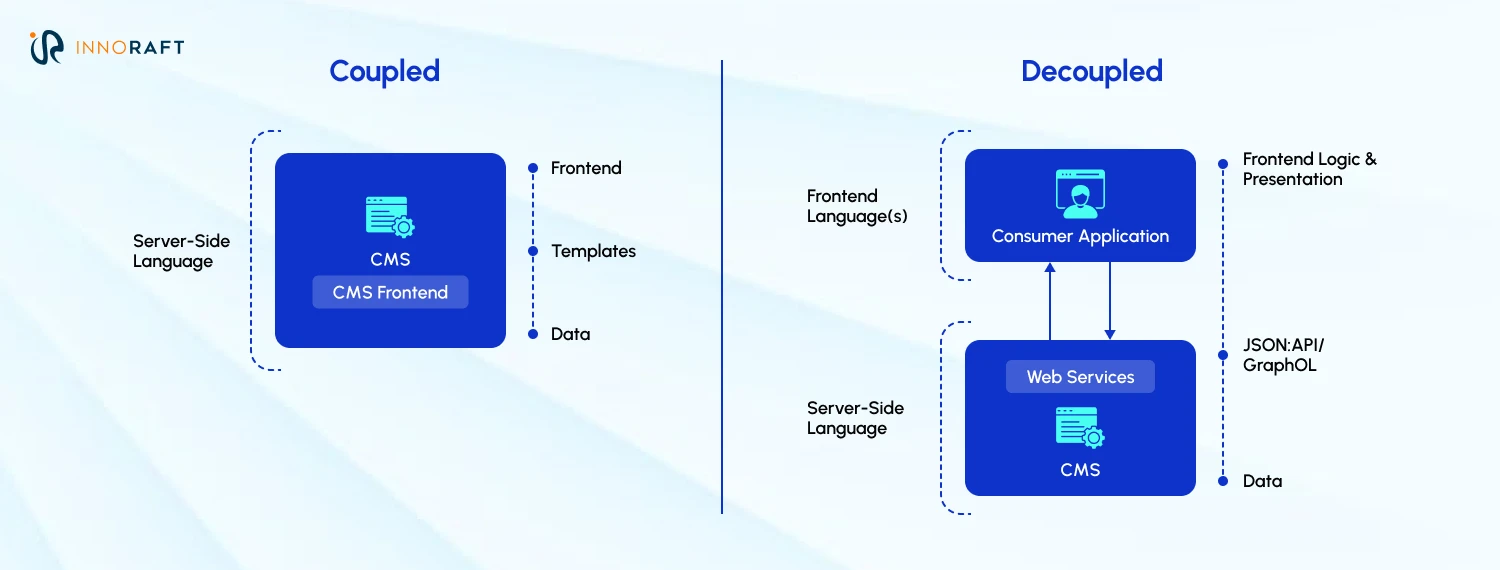
For years, Drupal only did one thing: store content and render it as HTML through its own templates. Mobile apps changed that. Once businesses needed the same content to feed a phone screen and not only a browser, Drupal had to start speaking a different language. Drupal 8 rebuilt the core on modern PHP components and added RESTful Web Services. JSON:API shipped in core soon after; GraphQL, still a contributed module rather than core, matured through the Drupal 9 and 10 ecosystem. By the time React and Vue became dominant frontend frameworks, Drupal's API layer was already built for them.
What Is Traditional Drupal?
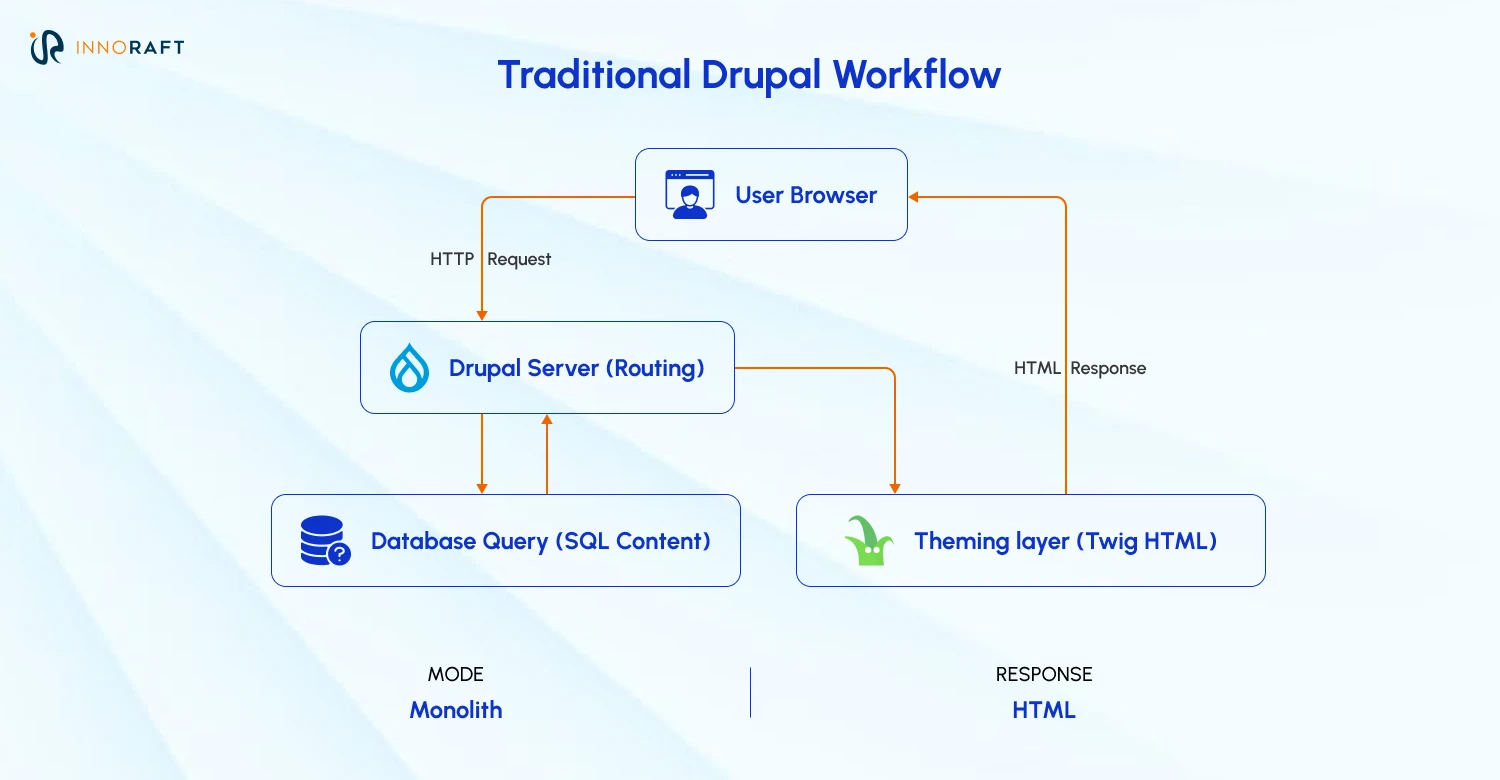
Traditional Drupal is a single system that handles both backend and frontend. It stores your data, manages workflows, and renders the pages visitors see via Twig. Each request takes one path from the browser to Drupal’s PHP kernel and back.
Where it wins:
- One system to build, host, and maintain, so the team stays small
- Layout Builder gives editors drag-and-drop control, no developer needed
- Views and menus map straight to templates, no custom API layer required
- Render cache, BigPipe, and cache tags keep pages fast with no extra infrastructure
Where it struggles:
- Content is baked into HTML, so feeding an app the same data takes real engineering
- Frontend developers primarily work in PHP and Twig, not React or Vue
- The admin interface lives inside the same application, so access controls need real care
What Is Headless Drupal?
In a Headless Drupal architecture, Drupal no longer serves the presentation layer, becoming a content repository that hands data to whatever frontend needs it, through REST, JSON:API, or GraphQL. That frontend might be a Next.js or Nuxt site, a native iOS or Android app, or a smart TV interface, since headless just means Drupal has stopped rendering the presentation layer. When using Drupal headless architecture, any application that can consume an API can be the head, not only a JavaScript framework.
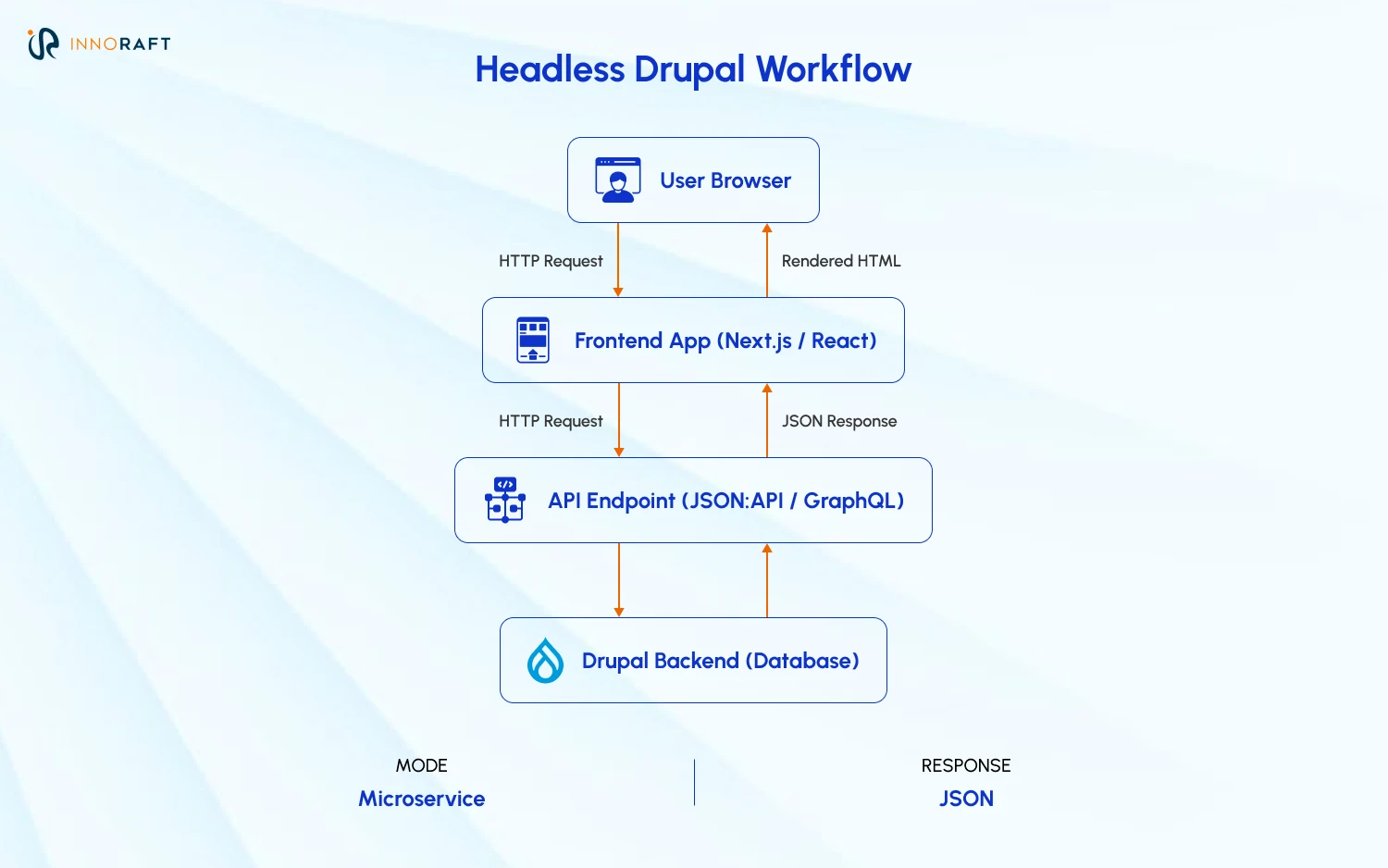
Acquia, a company owned by Drupal’s founder Dries Buytaert, draws a line between two terms people use interchangeably: Decoupled Drupal architecture means the frontend can still live inside Drupal or as a separate application, while Headless Drupal means the presentation layer moves outside Drupal entirely. Either way, the frontend, often called the head, talks to Drupal, the body, through a structured API.
Where it wins:
- Publish once and deliver to websites, apps, wearables, and digital signage from one backend
- Static generation on the frontend can cut load times by a wide margin
- Drupal's database sits behind a firewall, exposing only the API endpoints it needs to
Where it struggles:
- Two codebases, two hosting setups, and specialized API skills most in-house teams have to hire for
- Layout Builder, in-place editing, and native menus all have to be rebuilt on the frontend
- Editors can't preview a live page without a custom preview pipeline built for it
Traditional and Decoupled Architecture: Key decision areas
Since we now have an understanding of the differences between Headless Drupal vs Traditional Drupal, let's compare these two architectures based on key decision areas that usually impacts enterprises:
How Do Traditional and Headless Drupal Compare on Content Management?
Editors do largely the same job either way, since both Headless CMS vs Traditional CMS architecture use Drupal as the content repository. What changes in headless is visual control: Drupal no longer owns the page, so it can't show editors what content will look like before publishing.
| Feature | Traditional Drupal | Headless Drupal |
| Content preview | Instant and native | Broken by default; needs a custom preview pipeline, often via the decoupled_preview module or Next.js preview mode |
| Page layout control | Layout Builder, drag-and-drop | Set by frontend developers; layout changes usually need a dev ticket |
| In-place editing | Click-to-edit on the live page | Not available; all edits happen in the admin backend |
| Menu management | Add pages to navigation from the node edit screen | Menu data is exposed via API but must be coded into the frontend |
Losing preview and layout control is often the dealbreaker for marketing teams, which is why many organizations land on progressive decoupling instead of going fully headless. In a progressive Drupal headless architecture, the platform keeps rendering the main page, Layout Builder and native previews included. Only specific pieces, a search filter or a live dashboard, get handed to React or Vue and embedded inside the page. Editors keep the control they're used to, developers get the tools they need for the hard parts. Drupal's newer Experience Builder is also beginning to narrow this gap, bringing more visual editing to decoupled setups over time.
How Much Frontend Flexibility Does Each Architecture Give You?
Traditional Drupal renders HTML on the server, page by page. Headless removes that ceiling and lets the frontend repaint instantly, no full reload.
Building something app-like in traditional Drupal, a checkout flow or a live dashboard, still usually means layering JavaScript on server-rendered markup and living with a full page reload on every click. Single Directory Components and modern JS libraries ease that, but don't remove the reload by default. Headless works differently: once loaded, the Drupal frontend framework asks for new data through JSON and updates the page instantly. That's what makes React, Vue, and Next.js worth it:
- Single-page interactivity closer to a native app than a website
- One backend feeding a website, a mobile app, and a kiosk identical content
- Reusable components, so a product card gets built once and used everywhere
When it comes to Headless Drupal vs Traditional Drupal, the traditional approach wins on convenience, the frontend is already wired up. Headless wins on ceiling and hiring: build nearly anything, hire from a wider React or Vue pool, but own the entire presentation layer.
Where Do Performance Gains Actually Come From?
Traditional Drupal earns speed through internal caching: page cache, dynamic page cache, and tools like Varnish or Redis, built to avoid rebuilding pages on every visit. Its cache tags system invalidates only the exact content that changed, a precision many headless CMS platforms still don't match. Decoupled Drupal architecture earns speed differently, by pushing that work to a CDN like Cloudflare or Vercel's Edge Network, serving a Tokyo visitor from a Tokyo edge node instead of routing back to one origin server, while Drupal's own job shrinks to caching API responses.
| Traditional Drupal | Headless Drupal | |
| How caching works | Page cache, dynamic page cache, Varnish, Redis | Drupal caches API responses; a CDN caches the rendered output |
| Bottleneck vs. advantage | Every request still touches the web server and often PHP/MySQL | Pages can be served from edge nodes near the user; Drupal is rarely touched |
Rendering strategy matters just as much as caching. Traditional Drupal mostly rebuilds with Twig on every request, though BigPipe and lazy builders stream cached parts of a page while slower blocks load behind them. Headless Drupal frontend framework get three main strategies, each suited to a different type of page.
| Strategy | How it works | Best for |
| Static Site Generation (SSG) | Pages are pre-built as static HTML at deploy time | Blogs, marketing pages, content that rarely changes |
| Server-Side Rendering (SSR) | HTML is built the moment a user requests the page, pulling live data | Carts, dashboards, dynamic search results |
| Incremental Static Regeneration (ISR) | Pages are pre-built like SSG, then quietly rebuilt in the background when content changes | Large sites showing shared or public data |
None of this happens automatically. A headless build with no CDN and no static generation can run slower than a well-cached traditional site. SSR and ISR also still need client-side hydration, the step where the browser reattaches interactivity after the HTML arrives, adding its own brief delay. Speed comes from how the frontend is engineered, not from the word "headless."
How Does Omnichannel Delivery Differ Between Headless Drupal vs Traditional Drupal?
Traditional Drupal was built to render HTML for a browser. Headless Drupal architectures are designed to feed content to anything that can make an API call. The gap shows the moment a traditional site needs a native mobile app: apps need raw data, not HTML, so Drupal ends up serving pages and structured APIs at once, adding real complexity as more channels get added. Some teams solve this by exposing JSON:API directly or building a thin middleware layer, but plenty still buy a second system just for the app, so editors publish the same article twice.
| Traditional Drupal | Headless Drupal | |
| Primary output | Fully styled HTML pages | Raw data (JSON or GraphQL) |
| Content management | Risk of duplicate work across platforms | Single source of truth, one publish action |
| Adding a new channel | Requires backend restructuring | Requires little to no backend work |
| Best used for | Standalone websites, blogs | Web, app, IoT, and kiosk ecosystems |
Decoupled Drupal architecture runs on different logic, often shortened to COPE: create once, publish everywhere. The backend doesn't care what's asking for content, it just returns JSON. Write an article once, and it reaches the website, the iOS and Android apps, and a digital display without a second login. A 2024 DropTimes study found roughly 80% of the world's top 100 universities run Drupal on at least one web property, many across dozens of sites. This omnichannel capability has made Drupal the choice of CMS for both educational and government organizations.
How Does the Development Workflow Actually Change?
Traditional Drupal usually runs on one team and one release cycle. Headless splits both in two: backend developers who manage Drupal and API endpoints, and frontend developers who rarely open the admin.
Deployment follows the same split. Traditional Drupal ships one codebase on one cycle, so a backend patch and a frontend fix go out together, tested together. Decoupled Drupal services separates deployment entirely: the frontend ships a design change Monday, the backend pushes an API fix Wednesday, and neither waits on the other.
That independence has a cost. Somebody has to own the API contract: what fields exist, what counts as a breaking change, and how both teams get warned before one ships something the other depends on. It's usually the first conversation Innoraft has with a client moving to headless.
What's Different About the Day-to-Day Editorial Experience?
Editors feel this decision more than almost anyone on the project. In traditional Drupal, a mistake is easy to catch, the preview looks exactly like the live page. In headless Drupal setups, editors fill out fields and hit save without seeing the result until a developer, or a QA pass, confirms it is rendered correctly. Teams that skip a custom preview tool tend to see more corrections after publishing, since nobody caught a formatting problem before it went live.
How Does Each Architecture Handle Scalability?
Traditional Drupal isn't stuck on one server. Multiple web nodes, Redis, Solr, and a CDN in front of Varnish let it scale horizontally. Drupal headless architecture scales differently, since the frontend and backend can grow apart from each other.
Requests that miss cache still reach the same backend stack, database included, no matter how much caching sits in front of it. In headless, a traffic spike mostly hits the CDN and frontend servers, and the Drupal database barely notices. That gap is part of why the global headless CMS software market, worth roughly $2 billion in 2026, is projected to pass $6 billion by 2033 according to Grand View Research. Enterprises with unpredictable, high-volume traffic are driving that curve, not small brochure sites.
What's the Best Way to Decide Between Headless Drupal vs Traditional Drupal?
There's no universal right answer, only the one that fits your team and roadmap. That’s why at Innoraft, our experts suggest enterprises wanting to build scalable Drupal platforms to ask these six questions-
- How many digital channels will consume this content? One website points to traditional. Web plus app plus kiosk points to headless.
- How custom does the frontend need to be? Standard marketing pages rarely need headless; a highly interactive product usually does.
- Who's on your team today? Drupal generalists favor traditional. Separate frontend and backend specialists favor headless.
- How independent do your teams need to be? If frontend and backend already share sprints, decoupling adds process without much payoff.
- How important is editorial autonomy? Marketing-heavy teams that want full visual control over pages often rule out fully headless before any technical talk starts.
- What does the roadmap look like two years out? Headless costs more upfront but avoids a rebuild if omnichannel plans are already on the table.
Which Architecture Fits Your Strategy?
Between Headless Drupal vs Traditional Drupal, there’s no wrong choice. Traditional Drupal still runs some of the largest, fastest sites on the web, with a smaller team and shorter timeline. Headless earns its added cost when content needs to live in more than one place, or when the frontend has to do things Twig was never built to do. For a lot of enterprises, the real answer sits between the two: progressive decoupling does the job without the full cost of going fully headless.
The right starting point is your own roadmap, not whatever's trending in Drupal circles this year. If you're weighing this for an upcoming build or migration, Innoraft's Drupal team can walk through your content, channels, and team structure, and help you land on the architecture that fits your business.
Ready to take the first step? Contact us today!
FAQ
Frequently Asked Questions
Didn’t find what you were looking for here?