1 Jul, 2026
Drupal Migration Guide for WordPress & Legacy CMS

Is your website still working as it used to five years ago? Or are you working around it?
It's a reality many teams face, especially those working with WordPress or any other aging legacy CMS- page builders straining under demands for new features, plugin conflicts breaking site workflows, and security patches that cannot keep pace. In fact, a study into WordPress vulnerabilities revealed that while WordPress core is safe and stable, it is the huge ecosystem of plugins and themes that poses bigger threats, leading to 91% and 9% vulnerabilities, respectively. Needless to say, if your CMS cannot keep pace with changing business requirements and an evolving security landscape, then it's high time for a legacy CMS migration.
In the context of a growth-ready CMS, Drupal presents itself as a robust, practical, and flexible option. Built around structured content, granular permissions, and an architecture that holds up at scale, Drupal is the go-to choice of CMS for government institutions, universities, and large enterprises, despite a smaller overall market share.
In the following Drupal migration guide, we'll cover some crucial information you must know to plan the move to Drupal with confidence: when migration makes sense, what content you can carry over, a step-by-step roadmap, the mistakes that sink more migration efforts, and last but not least, how to protect the SEO equity you've spent years earning.
Is it Time to Migrate to Drupal?
If you've read any thorough comparison piece on CMS like Drupal vs WordPress vs AEM, you'll already know that Drupal offers extensive open source excellence. But the decision to migrate shouldn't only be based on a comparison. Rather, it should be based on the challenges your website is facing. Most of the time, one or two issues, such as slow page loading, can be fixed with optimizations. However, there are certain challenges that demand enterprise Drupal migration. These challenges are-
Common triggers:
- Unsupported or outdated CMS: Unsupported or outdated CMS: Often, the outdated versions of CMS stop receiving updates. For example, WordPress only offers security and support updates for the latest major release of WordPress. The previous releases may or may not receive a security update.
- Poor Performance: Slow page loads, broken graphics, poor interactivity, and high-latency issues like these can harm core web vitals and conversion rates.
- Security risks: Aging systems are a favorite target for attackers, and it's not for lack of effort on the IT side. Even teams that stay on top of patches can miss a loophole buried in plugin code that's been layered on for years.
- Growth bottlenecks: Legacy setups can choke due to high traffic on the website. Managing massive content libraries during rushes might feel impossible.
- Frustrating workflows: When developers and writers aren't speaking the same language about how content should work, even simple updates turn into a back-and-forth that eats up days.
- Messy connections: Older CMS platforms are not compatible with modern CRMs or headless setups like Drupal, which is why bolting them together doesn’t always work. This mismatch can often lead to sync issues, duplicated data, and broken integrations.
- Scaling pains: Running several global brand sites off one outdated foundation quickly turns into a truly massive administrative burden.
Key takeaway: Spotting three or more of these major warning signs? Connecting with a Drupal Migration Services provider is probably the best move for your business.
What Can You Migrate to Drupal?
Nearly any structured content source can be migrated into Drupal with the right mapping and transformation logic. Whether you are conducting a WordPress to Drupal migration, or from other platforms like Joomla, Sitecore, SharePoint, custom platforms, or even older Drupal versions to Drupal 10 transition, all are proven migration paths. The real variable isn't whether migration is possible; it's how much mapping and custom development it takes to do it well.
| Source CMS | Migration Complexity | Notes |
| WordPress | Easy–Moderate | Simple blogs migrate easily; enterprise sites with page builders, custom fields, or WooCommerce need more mapping |
| Joomla | Moderate | Requires careful content mapping; component-based structure differs from Drupal's |
| Sitecore | High | Enterprise content restructuring, often with multi-language templates |
| SharePoint | High | Document-heavy migration; permissions and metadata need explicit mapping |
| Custom CMS | Varies | Custom migration scripts are often necessary |
| Older Drupal versions | Easy–High | Drupal 9 to 10/11 is typically straightforward for well-maintained sites; Drupal 7 (and unmaintained Drupal 8 sites) usually need a fuller rebuild-and-migrate approach |
Legacy CMS migration complexity comes down to three factors: how structured your content already is, how many custom fields or templates you run, and whether your data lives in a clean database or is scattered across documents and third-party systems. A simple WordPress blog may move relatively quickly, while a large SharePoint intranet typically needs a dedicated migration project once QA, redirects, and SEO validation are factored in.
Key Takeaway: Drupal has some of the best modules to power your website. But when it comes to migrating to Drupal, modules like Migrate API, paired with contributed modules like Migrate Plus and Migrate Tools, can pull data from nearly any CMS. However, this only works with the right planning behind it. Skipping that planning is the single biggest reason migrations stall.
What Does a Drupal Migration Guide Roadmap Look Like?
A reliable Drupal migration guide follows six stages: audit, content mapping, environment setup, content migration, media migration, and SEO preservation. Skip a stage, and it tends to resurface later as a launch-day fire drill.
Step 1: How to Audit Your Existing Website
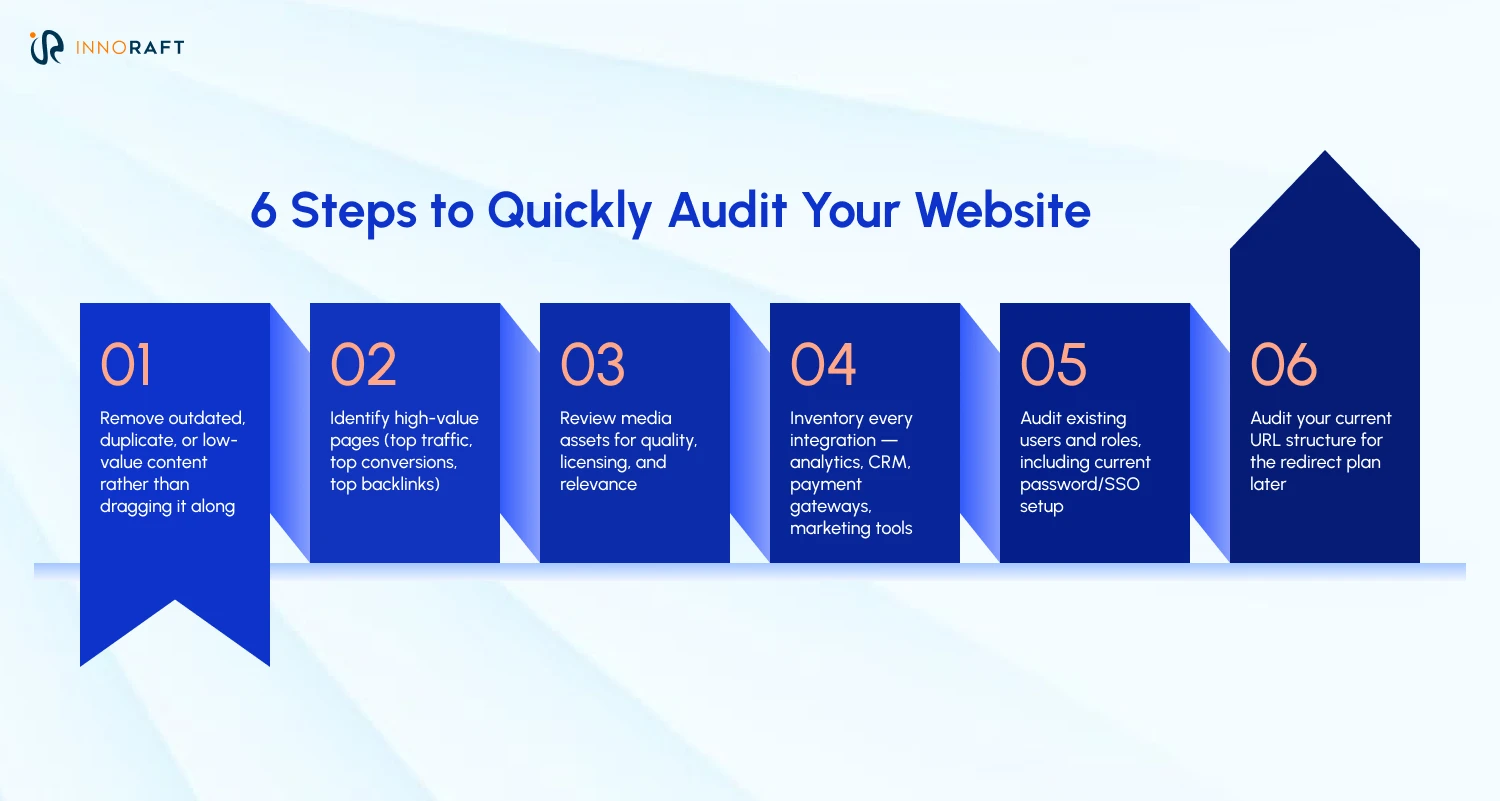
Before beginning the CMS Migration to Drupal, you need to know exactly what you're moving. This alone prevents most surprises later. Most teams also schedule a brief content freeze near the project's end, so the source site stops changing while the final migration runs.
Here’s a quick guide to help you with the website audit stage-
Step 2: Mapping Content to Drupal
Migrating your data is a thoughtful translation, not just some basic copying chore. Most Legacy CMS migrations don't map cleanly onto a modern Drupal setup, so you can't just migrate assets and figure out where they'll live later. This decision needs to happen up front, asset by asset.
| Existing CMS | Drupal Equivalent |
| Posts | Article |
| Pages | Basic Page |
| Categories | Taxonomy |
| Images | Media |
| Users | User Accounts |
Categories, tags, and custom classification schemes typically map to Drupal taxonomy vocabularies and terms, though rarely one-to-one. User accounts carry their own wrinkle: password migration depends on the source platform; some systems preserve existing hashes, others require a reset on first login, and SSO typically needs reconfiguring against Drupal rather than carrying over automatically.
Step 3: How to Prepare Your Drupal Environment
With the content model defined, in this stage of the Drupal migration guide, you need to set up the technical foundation on which it will live.
- Run Composer to cleanly install Drupal core and its dependencies.
- Grab the contributed modules your specific content needs.
- Pick a secure, high-performing host.
- Build dev and staging sites before ever touching production.
- Keep all code and settings in version control.
- Push updates using Drupal's configuration manager instead of live-editing.
Step 4: What's the Best Way to Migrate Your Content?
This is where enterprise Drupal migration tooling does the heavy lifting. Get this pipeline right, and the data follows effortlessly. However, it is important to note that here, you need to separate two things people usually lump together: content migration moves articles, pages, and media; configuration migration (content types, fields, views, permissions) is typically built directly in Drupal rather than pulled from the old system.
- Drupal's core Migrate API handles the extract-transform-load process
- Migrate Plus adds source, process, and grouping flexibility
- Migrate Tools provides the commands to run, monitor, and roll back migrations
- Custom source, process, and destination plugins fill gaps for non-standard data, complex migrations frequently need at least one
- Where the source system supports it, run a final delta migration before cutover to capture content changes made after the initial migration ran
Step 5: How to Migrate Media and Files WPlugin dependenciesithout Losing Data
Media is where CMS migration to Drupal quietly breaks, mostly due to broken image paths and dead embeds being some of the most common post-launch complaints.
- Images and their alt text/metadata
- PDFs and other downloadable documents
- Video embeds and hosted video files
- Internal links pointing between content pieces
- Embedded assets (forms, widgets, third-party scripts)
- File ownership and permissions, plus any external DAM integrations
- Image style configurations, recreated in Drupal so images render correctly across templates and view modes
Step 6: How do You Preserve SEO During a Drupal Migration?
This step of the Drupal migration guide protects revenue, not just rankings, and deserves as much attention as the content move itself. Here’s an SEO preservation checklist to help you during this stage.
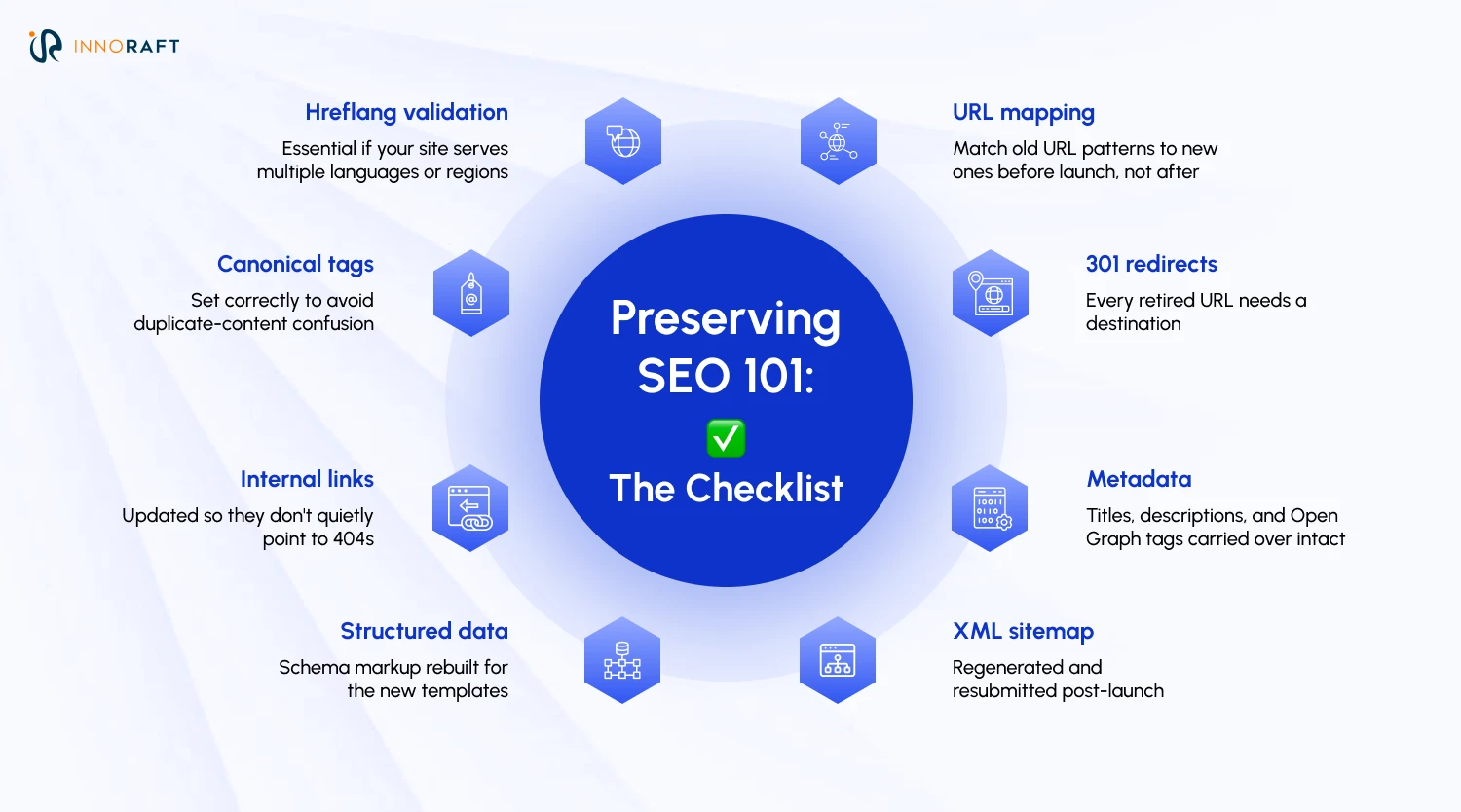
Migrating multilingual sites on Drupal adds real complexity here, since translations, language relationships, and hreflang structures all need to survive the move intact.
What are the Most Common Drupal Migration Challenges (and How do You Avoid Them)?
Most legacy CMS migration failures trace back to five recurring issues, which are data loss, broken URLs, missing media, SEO traffic drops, and plugin dependencies that have no direct Drupal equivalent. None of these are exotic or unpredictable; they show up in nearly every migration project, which means the fixes are well-documented, too.
| Challenge | Solution |
| Data loss | Back up everything and run test migrations before going live |
| Broken URLs | Build a complete redirect strategy before launch |
| Missing media | Validate every file migration against the original asset count |
| SEO traffic drops | Preserve URLs, metadata, and internal linking structure |
| Plugin dependencies | Evaluate whether an equivalent Drupal module exists; build custom functionality where it doesn't |
| Downtime | Use staging environments and a phased deployment plan |
Most of these Drupal website migration failures share a root cause: rushing from old site to new site without a rehearsal in between. Plugin-heavy WordPress sites are especially prone to this, since a single page can depend on five or six plugins, not all with a direct Drupal equivalent. Sometimes the answer is custom development rather than a drop-in replacement; sometimes it's worth revisiting the requirement itself. Teams that test on staging first catch these gaps before visitors do.
What Should You Test Before Your Drupal Site Goes Live?
Run a full pre-launch checklist covering content, functionality, and technical health, not just a visual scan of the homepage. A migration that follows the Drupal migration guide to the ‘T’ and "looks right" can still hide broken forms, missing redirects, or silent permission errors, and those tend to surface as support tickets in week one.
- Check content accuracy on every migrated page. This includes embedded media and tables, not just body copy.
- Click through navigation menus and internal links to make sure nothing's broken or pointing to the old site.
- Run every form end-to-end; contact, lead gen, checkout, whatever you've got. Don't stop at submission, confirm the confirmation emails actually arrive.
- Test site search and confirm content has been properly re-indexed. If your stack runs on Search API, Solr, or Elasticsearch, check those integrations specifically.
- Push mobile responsiveness across all your breakpoints, not just the obvious phone/tablet/desktop split.
- Test accessibility for real; keyboard-only navigation, screen reader compatibility, the works.
- Load-test performance under conditions that resemble actual traffic, not a quiet staging environment.
- Verify user roles, permissions, and content states (draft, in review, published) behave the way they're supposed to.
- Confirm analytics and tracking are firing correctly; this one's easy to miss until the data's already gone wrong.
- Validate SEO; redirects, metadata, sitemap, structured data, all of it.
- Check cache behavior; page cache invalidation, CDN integration, and whether updated content actually shows up after a change.
- Test redirects at scale. A handful of sample URLs won't tell you what's actually happening across thousands of pages.
- Have content editors walk through their real day-to-day workflow; not a guided admin training session, but the actual tasks they'll be doing on a Tuesday afternoon.
Treat this as a sign-off, not a formality, and have someone outside the build team run through it before launch.
How do You Optimize Your Drupal Site After Migration?
CMS migration to Drupal is the starting line, not the finish line. The sites that get the most long-term value from Drupal treat the weeks after launch as an active monitoring period, not a victory lap; small issues caught early stay small.
- Monitor performance and Core Web Vitals closely in the first few weeks, while traffic and caching patterns settle
- Fix crawl errors flagged in Google Search Console promptly, since unresolved redirects compound into ranking losses
- Review analytics for traffic or conversion anomalies versus the old site, page by page, where possible
- Train content editors on Drupal's workflow before they're left unsupervised. A short hands-on session prevents months of workarounds
- Keep Drupal core and contributed modules updated on a regular cadence rather than waiting for a security advisory to force it
- Plan a continuous improvement roadmap rather than treating the CMS as "done" once it's live
- Watch migration logs and content discrepancies during this stabilization period; small gaps tend to surface here rather than on launch day
Conclusion: Should You Do it Alone, or Partner with Experts?
No matter how many Drupal migration guide, you read, a full enterprise CMS migration touches content, SEO, integrations, and infrastructure at once. Getting all four right without prior Drupal experience is genuinely difficult. An experienced partner reduces risk and shortens the timeline.
This is where working with our expert team at Innoraft makes a measurable difference. With years of focused Drupal experience, we offer:
- Migration strategy tailored to your specific source CMS and content complexity
- Custom content mapping that respects your existing information architecture
- SEO preservation is built into the plan from day one, not bolted on afterward
- Minimal downtime through staged deployment and a carefully planned cutover process
- Enterprise integrations with CRMs, PIMs, and third-party platforms
- Post-launch support so the site keeps performing well after go-live
If you are weighing a move to Drupal from your legacy system, contact our experts to get the gears turning on the migration.
FAQ
Frequently Asked Questions
Didn’t find what you were looking for here?