12 Aug, 2026
How Drupal Improves Multi-Site & Multi-Language Management


What does digital fragmentation actually cost a growing business?
A company that opens in eight new markets over two years usually ends up running eight separate CMS installs, sometimes more. Each one needs its own patches, its own admin logins. IT stops building anything new and spends most weeks just keeping the existing sites alive.
That's the real price of fragmentation, and it accumulates fast. Security teams lose track of which install got which patch. Marketing teams recreate the same landing page five times because nobody trusts the "master" copy anymore. This piece looks at how Drupal multi-site management works, translation, and governance as one connected system instead of a pile of unrelated websites, and where as decoupled Drupal services experts we can help when the cracks in the foundation starts to show.
What Is Drupal Multi-Site Management and Why Does It Beat Isolated Installs?
Drupal multisite architecture runs many websites off one shared codebase while each site keeps its own separate database. That split cuts patch time from weeks to hours across dozens of sites, and it keeps each site's data isolated, which shrinks the blast radius of most site-level compromises.
That isolation lives at the database and file level, not the server. Every site still shares the same PHP runtime and codebase, so a server-level compromise can still reach more than one site. The real gain is how much smaller a typical content-level or account-level issue becomes.
Think of isolated CMS installs as a row of detached houses. Each house has its own foundation, its own wiring, its own alarm system. If the city updates the fire code, someone has to visit every house individually to fix it. That's what patching 40 separate legacy CMS installs looks like in practice: months of repetitive work, and a decent chance one house gets missed.
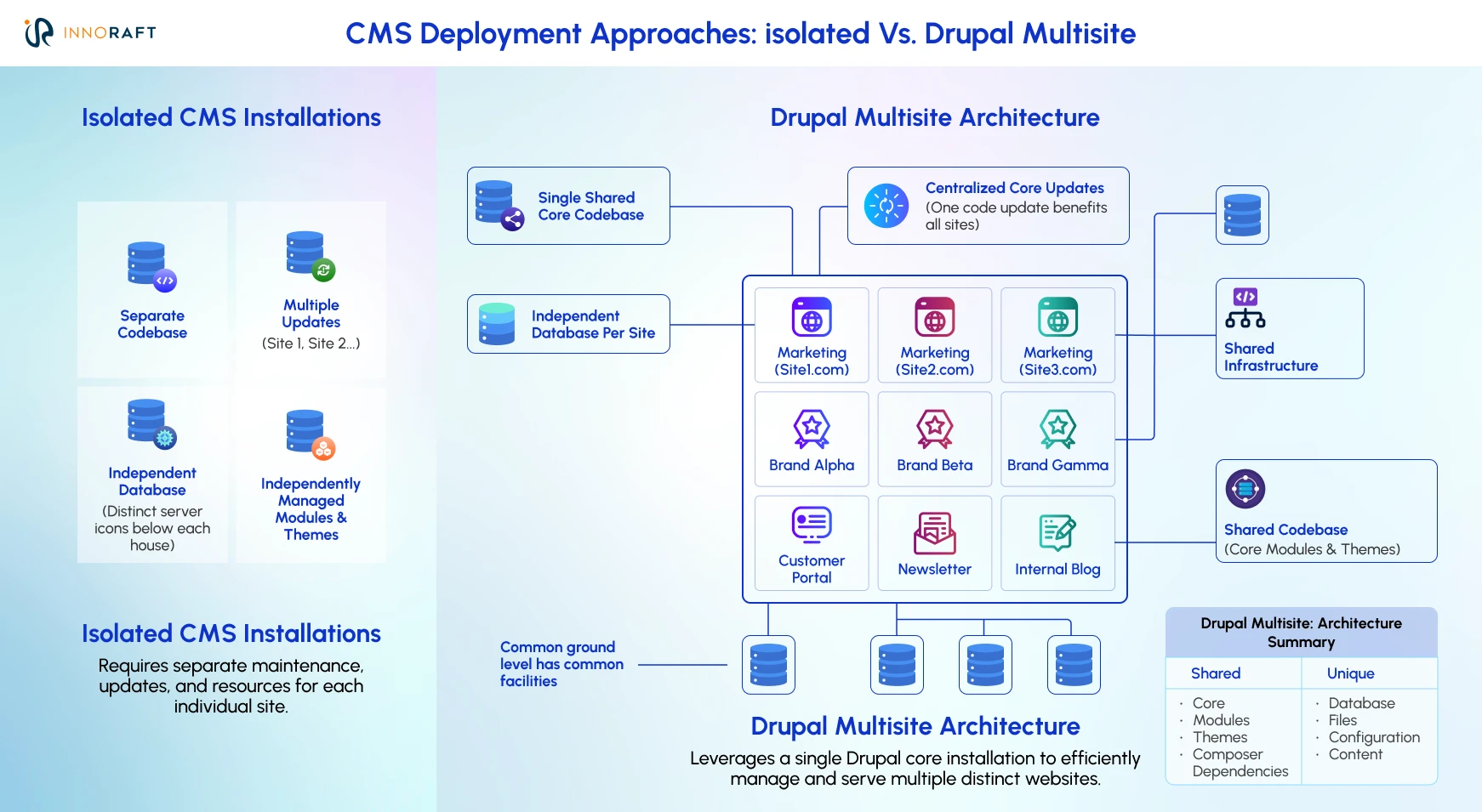
Drupal Multi-Site Management works more like an apartment building. One structure, one shared foundation, but each unit stays locked and self-contained.
- Shared codebase: Core, modules, and themes live in one place. Update it once, run the deployment, and the change rolls out everywhere, rather than getting patched site by site.
- Separate databases: Each site’s content, users and configuration are separate from each other, meaning content and settings in one site will not affect its neighbours.
- Independent domains: Each site can have its own domain or subdomain, without duplicating code behind it.
For organizations that want sites to share users and content on purpose, rather than staying walled off, the Domain Access module of Drupal multilingual CMS works differently. It behaves more like an open-plan office than an apartment building, with everyone working under one shared database. That's useful for a network of closely related regional brands. It's the wrong tool for anything that needs strict data separation, like a healthcare group or a bank with regulatory boundaries between subsidiaries.
Different Approaches to Managing Multiple Websites | |||
| Approach | Codebase | Database | Best suited for |
| Separate CMS installs | Duplicated per site | Duplicated per site | Small, unrelated projects |
| Drupal core multisite | Shared | Separate per site | Brands and regions needing strict isolation |
| Domain Access | Shared | Shared | Related sites sharing users and content |
Exact figures shift depending on who's counting, but the pattern holds across trackers. According to W3Techs' CMS usage statistics, Drupal enterprise CMS powers about 1% of websites whose CMS is known overall, but roughly 7% of the top 10,000 highest-traffic websites, demonstrating its disproportionately strong presence among large, high-traffic organizations.That gap isn't an accident. Large organizations like government and educational institutes running multiple websites tend to prefer Drupal specifically because Drupal Multi-Site Management solves a problem WordPress and most SaaS builders were never built to handle at that scale.
The payoff shows up in launch timelines too. Once the shared codebase and governance rules exist, spinning up a new regional site becomes mostly a configuration exercise. Teams that used to plan six months for a new market launch often bring it down closer to a few weeks, though the real number depends on hosting setup and how much of the shared codebase is already proven out.
What Is the Best Way to Handle Multi-Language Content Without Duplicating Pages?
Drupal not only helps as a multi-site CMS platform, but it also translates content at the field level, so a product page stays one entity no matter how many languages it appears in. Only the text inside each field changes. That's the opposite of the "clone" method, where editors copy an entire page for every language and hope nobody forgets to update all fifteen versions later.
The clone method breaks down the moment something changes globally. For example, if a product's price or hero image updates. With cloned pages, an editor has to hunt down every language version and update each one by hand. Miss one, and a customer in Brazil ends up staring at last quarter's price while someone in Germany sees the new one.
Field-level translation avoids that problem entirely during Drupal Multi-Site Management. The product stays a single entity in the database. Price and SKU can stay shared across every language, while the description and other language-specific fields carry translated content on their own. Change the price once, and it updates everywhere the product appears, regardless of language.
| Feature | Field-level translation | Clone Method (Node Translation) |
| Node ID (NID) | Same NID for all languages | Different NID for every language |
| Shared Data (e.g., Images) | Shared automatically across languages | Duplicated; requires active synchronization |
| URL Aliases | Handled via language prefixes (e.g., /en/node/1 , /es/node/1) | Separate paths entirely (e.g., /node/1 , /node/2) |
| Workflow/Revisions | Workflows apply to the specific language revision | Workflows apply to the entire independent node. |
| Best Used for | 99% of modern Drupal sites | Legacy D7 migrations, or when languages require completely unique layouts and legal lifecycles. |
Drupal ships with four core modules for this: Language, Content Translation, Interface Translation, and Configuration Translation. Between them, more than 100 languages are available immediately after installation, covering everything from visible content down to menus, forms, and admin labels. Additionally, Drupal AI translate module helps add one-click, AI-powered translation to Drupal's translation system.
Another feature worth mentioning here is language fallback. If a translator hasn't finished the Japanese version of a new article yet, Drupal enterprise CMS can be configured, through language negotiation and entity translation settings, to fall back to the English version instead of leaving visitors without localized content. This isn't automatic in every installation out of the box, but once it's set up, visitors get something useful instead of a 404, and search engines don't index a dead link.
The multi-language capability is not just a “nice-to-have” feature for your website. CSA Research surveyed close to nine thousand consumers across 29 countries and found that 76% of online shoppers prefer buying products with information in their own language. Forty percent said they would never buy from a website in another language at all. Field-level translation is what keeps that content accurate and current across every market a brand touches, without the SEO damage duplicate or half-translated pages tend to cause.
How Does Drupal Balance Global Brand Control With Local Team Autonomy?
Configuration Management (CMI) and the Config Split module let a central team lock in shared rules, like the header, the core typography, and security settings, while regional teams get their own slice of configuration for Drupal localization local tools and page layouts.
This tension shows up in almost every global rollout. Headquarters wants a consistent brand and a single security posture. Regional marketing teams want room to run their own campaign pages, add a local integration, or adjust a layout for a market that behaves differently. Handled badly, this turns into either a rigid site nobody local can touch, or a set of rogue regional sites that drift so far from the brand they become unrecognizable.
CMI treats configuration, things like content types, views, permissions, and other settings, as version-controlled code rather than values buried in a database. A "core config" gets defined once and pushed to every site in the network. Config Split was originally built to handle differences between environments, staging versus production being the classic case, and many teams also use it to separate configuration for specific sites or regions without conflicting with the shared core. It isn't the only option for that kind of flexibility in Drupal Multi-Site Management, though. Some teams instead rely on Recipes, separate config directories, install profiles, or other override strategies.
In practice, a typical governance setup looks like this:
- HQ defines and version-controls the shared configuration: branding, security, base content types.
- A tool like Config Split, or a comparable configuration-separation approach, isolates each region's local additions into their own config set.
- Deployments apply the shared core everywhere, and the local layer separately, without overwriting each other.
The result is governance without any roadblocks. Executives get the brand consistency and security posture they're accountable for. Regional teams keep the room to move fast on their own campaigns and tools. This flexibility makes migrating to Drupal a more attractive option for businesses.
How to Automate the Translation Workflow Instead of Chasing Spreadsheets
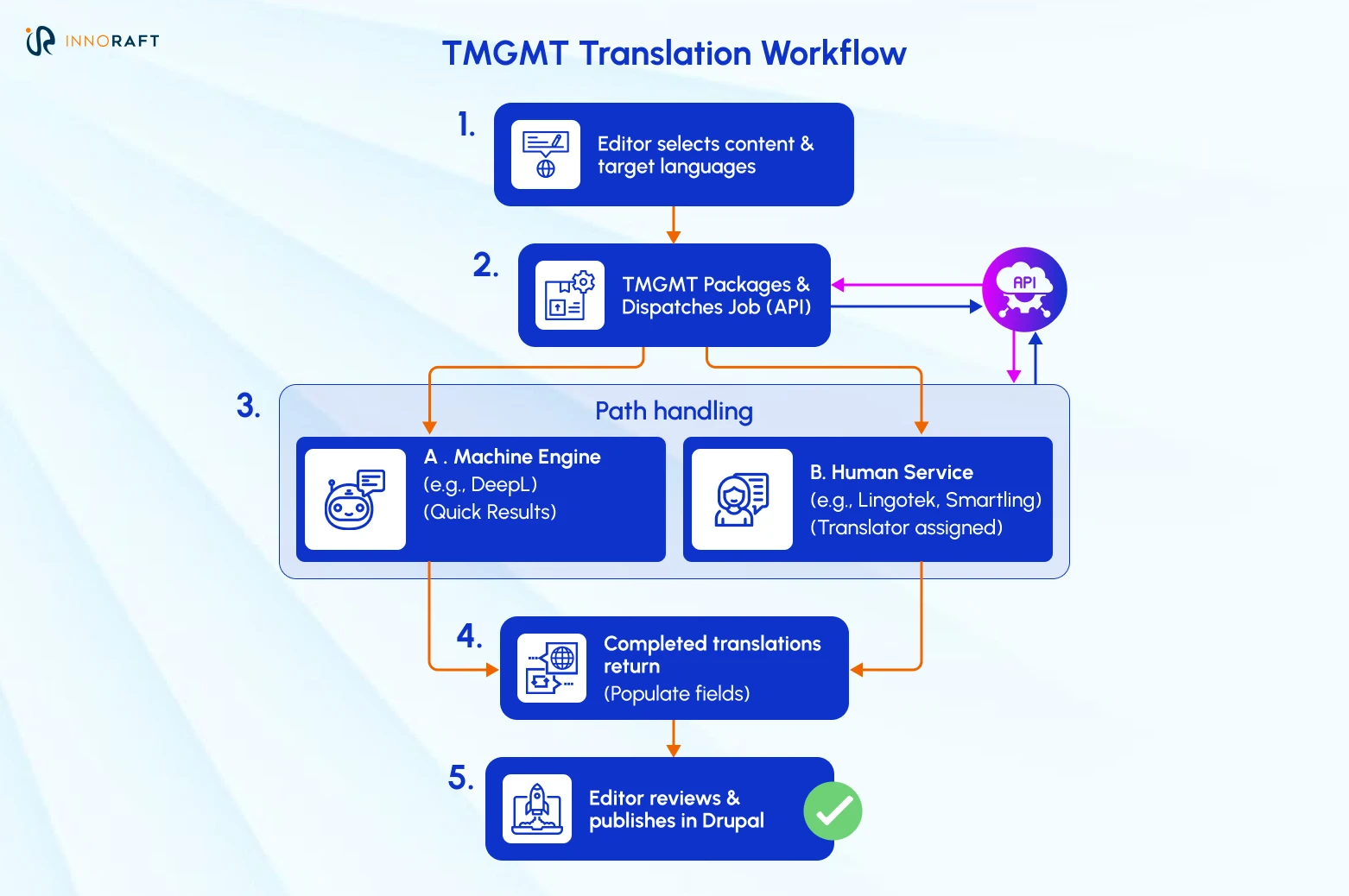
The Translation Management Tool, known as TMGMT, connects Drupal multi-language websites to translation providers through connector modules that talk to each provider's API. Editors request a translation with one click, and the finished text lands back in the correct field on its own, no spreadsheet or email thread required.
Without it, the actual human process of translation is usually where things fall apart. An editor exports content to a spreadsheet, emails it to an agency, waits days, then copies the results back into the CMS field by field. Every handoff in that chain is a chance to lose formatting, miss a field, or introduce a version conflict. TMGMT replaces that with a workflow inside Drupal itself:
- An editor selects the content that needs translation and picks the target languages.
- TMGMT packages the job and sends it, through an API, to a connected provider.
- Through the matching TMGMT connector, a machine engine like DeepL handles it in minutes, or a human service like Lingotek or Smartling assigns it to a translator.
- Completed translations flow back and populate the matching fields automatically.
- The editor reviews the result inside Drupal and publishes.
The time saved compounds with every language and every site added to the network. An editor managing content across twelve markets is no longer the bottleneck. The API call handles the coordination that used to take a project manager and a shared spreadsheet.
What Is Decoupled Drupal and Why Does It Matter for Multi-Site Brands?
Decoupled, or headless Drupal exposes structured multilingual content (entities, fields, and their translations) through JSON:API, so a mobile app or an in-store kiosk can pull the same content and language rules a website already uses. Nothing gets rebuilt from scratch for the next channel.
A website used to be enough. It rarely is now. Brands need to push localized content to native apps, kiosks, and other surfaces that don't run in a browser at all. Building separate Drupal localization logic for each of those channels multiplies the maintenance problem this whole architecture was supposed to solve in the first place.
JSON:API changes that math. Drupal's entities, fields, and translations can all be exposed to any frontend framework, React and Vue included. Each site still runs its own API, but the underlying content structure stays consistent across all of them, so the frontend team can build whatever the channel needs while Drupal remains the single source of truth.
This isn't a niche bet either. ResearchAndMarkets forecasts the headless CMS software market will pass $1.62 billion by 2027, and that's before counting the broader composable and API-first tooling built around it. Brands setting up decoupled Drupal now aren't rebuilding their localization logic when the mobile app project lands on someone's roadmap next year.
Where Should You Go From Here With Your Multi-Site Strategy?
Drupal Multi-Site Management turns a scattered set of websites into one governed platform, and that shift changes what IT actually spends its time on. Instead of patching forty installs and chasing translation spreadsheets, teams start building things that move the business forward.
Drupal multisite architecture, field-level translation, config splitting, and a connected translation pipeline all need to be planned together. If your team is weighing a multisite rebuild or trying to fix a translation process that's gone off the rails, Innoraft's Drupal architects can walk through what a governed, multilingual setup would look like for your specific site count and market list.
Ready to take the next step to build multi-site and multilingual website using Drupal? Connect with us today!
FAQ
Frequently Asked Questions
- Massive ROI on Maintenance: Update the core codebase once, and the patch rolls out across hundreds of sites simultaneously.
- Brand Consistency: Enforce a global corporate theme while allowing local teams to manage their own content.
- Reduced Server Overhead: Hosting one codebase with multiple databases is much cheaper and faster than hosting 50 entirely separate CMS installations.
- Separate Installations: 10 websites = 10 codebases, 10 databases, and 10 separate update processes. High isolation, but high maintenance.
- Multisite: 10 websites = 1 codebase, 10 databases, and 1 central update process. Maximum efficiency for sites that share similar functionality.
- Higher Education: Universities managing hundreds of distinct department, faculty, and alumni websites.
- Government & Public Sector: Agencies that need strict security and standardization across various municipal portals.
- Global Enterprise & Franchises: Multinational brands that need centralized corporate control while allowing regional branches to publish localized, translated content.
Didn’t find what you were looking for here?