18 Mar, 2026
UX Strategy Playbook 2026: From User Research to Implementation


Stop obsessing over the interface.
If your product team is still just pushing pixels and arguing about button placements, you’re solving the wrong problem. The entire discipline of UX strategy changed while we weren't looking. We don't just map out predictable, linear journeys anymore. Why? Because clicking a button in an AI-native app doesn't always do the exact same thing twice.
You aren't designing screens. You are designing ecosystems. Probabilistic systems. We are building agentic experiences, meaning the AI actively makes decisions on the user's behalf.
Old-school wireframes often break down when an interface adapts in real-time. You need a new approach, a brand new UX strategy playbook. To actually visualize this shift, look at the modern architecture of product decision-making.
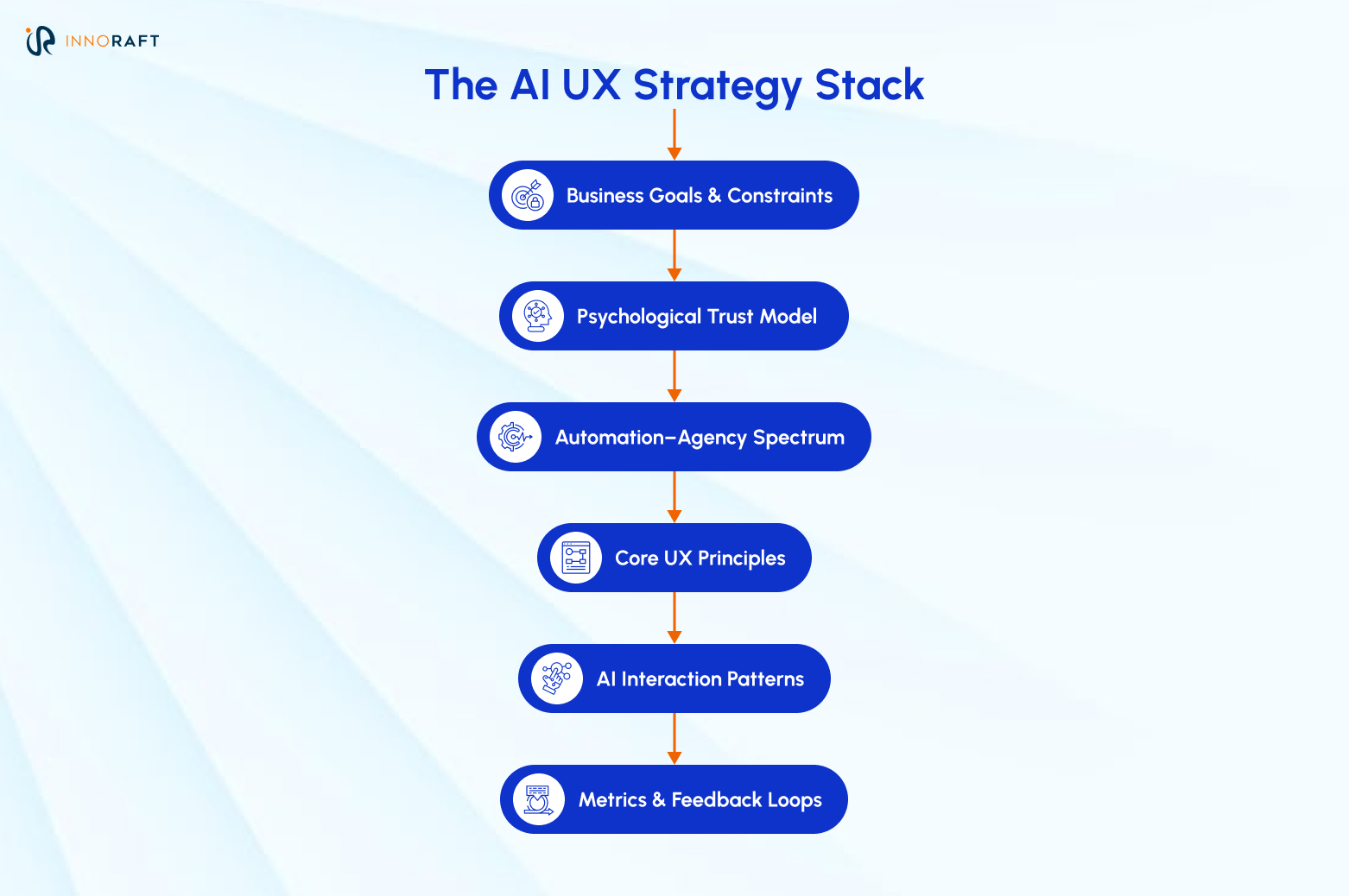
Think of this UX optimization stack as a filter. Each layer dictates what the layer below it is allowed to do. That guarantees your interface patterns actually align with what the business needs and what the user trusts.
Who this playbook is for:
- Product teams trying to shove AI into existing legacy software.
- UX designers tasked with building AI copilots.
- Product leaders building AI-native workflows from scratch.
- Researchers trying to figure out why users don't trust the new automation features.
UX Strategy Playbook Section 1: How to Build a UX Strategy?
Building a robust UX strategy that balances both data and emotion is not an easy task. However, with a step by step process it becomes easier to create and implement a strategy that is also optimized for the future. Creating a real UX strategy today means defining the invisible scaffolding of your product. Figure out how human psychology actually intersects with machine autonomy long before opening Figma.
Step 1: Problem Framing
Too many businesses frame missing features as problems during the UX strategizing phase. This is an inescapable trap.
As one of the premium web design services providers, Innoraft’s experts suggest that you look at the experience gaps instead. Once you have a view of the entire UX roadmap and user journey, it becomes easier to identify the real problems instead of just thinking about the missing features.
Use tools like journey mapping or service blueprints to frame the problem right before you start design. Don't say "We need an auto-fill feature." Say "Users bail on this workflow because typing data manually completely breaks their focus." This opens up real, systemic solutions helping you with UX research methods further down the process.
Try running this quick AI Workflow Friction Audit with your team:
- Where are users doing brain-dead, repetitive cognitive work?
- What steps force them to review massive walls of data?
- Where are they absolutely terrified of making a costly mistake?
- What specific task could a machine analyze faster than a human?
Find the spots where automation reduces the cognitive load without stealing the user's control.
Step 2: The Psychological Buffer
LLMs are commodities. Everyone has access to the exact same models. Soon, the only thing separating your product from a competitor's is psychological comfort.
How does your user actually feel when the system takes the wheel? Relieved? Or anxious and suspicious? Your UX strategy must have a psychological safety net. That trust is your only real competitive buffer now.
Step 3: AI-Augmented UX Research Methods
AI is changing UX as we speak, and to implement AI in our UX lifecycle, we are drowning in qualitative data. We can cluster a thousand interview transcripts in three minutes and mine support tickets for behavioral roadblocks almost instantly. But does this influx of data make the design thinking process easier? Not really.
Here’s how you can simplify: automate the grunt work, not the interpretation. Let the AI organize the mess. Keep your human researchers focused on reading between the lines to catch the weird nuances and biases the machine misses entirely.
Step 4: The Automation–Agency Spectrum
This is the part most teams often get wrong during UX optimization. You need strict rules for product trade-offs.
Define exactly when the system acts alone versus when it acts as a copilot.
| Maturity Level | System Role | Human Role | Real-World Example |
| AI-Assisted | Suggests options. | Makes the final decision and executes. | Email autocomplete suggestions. |
| AI-Guided | Drafts the work or takes action | Reviews, edits, and approves. | AI generates a monthly report draft for review. |
| Autonomous | Executes independently. | Intervenes only when alerted to exceptions. | Automated fraud blocking on a credit card. |
The golden rule? The user always keeps ultimate control. Even when the machine does 99% of the work.
Step 5: Prioritized Rollouts
Don't jump straight to Phase 3 of the autonomous UX roadmap. Structure your rollout based on that maturity model. Start with Assist. Move to Guide. Only touch Autonomous when you have strict reliability thresholds and bulletproof auditing logs in place.
Step 6: Concept Validation
Static mockups can't validate agentic workflows. You have to test the concept itself.
Run Wizard-of-Oz testing. Have a human secretly simulate the AI’s responses on the backend. Watch how users react to the idea of automation before you spend a dime having engineering write the actual logic.
Step 7: Define Success Metrics
Time-on-task is a useless metric for probabilistic systems. You need to define UX trust metrics and KPIs to measure the impact of your new UX strategy playbook.
- Behavioral Trust: Watch the override rates. Are they constantly manually editing the AI's suggestions?
- Attitudinal Trust: Run targeted surveys. Do they actually feel confident letting the system run?
If they try your shiny new generative feature once and never come back to it, your adoption strategy failed.
UX Strategy Playbook Section 2: How to Implement the UX Strategy?
Vision boards are great. But execution can be brutal. UX implementation process is where your high-level principles crash headfirst into API rate limits and model hallucinations. That is why you need a collaborative, tactical process to ensure your future-ready UI/UX strategy implementation translates into success for you.
Step 1: Stakeholder Alignment
You need strict decision rituals as an integral part of your user experience strategy guide. Run highly tactical cross-functional design reviews with your engineers and data scientists. Put mandatory AI ethics checkpoints in place before any new model behavior touches production. Keep everyone grounded in the original psychological vision.
Step 2: Tactical DesignOps
Use internal operations for your UX roadmap to speed things up. Build design tokens specifically for AI states, like 'generating' or 'error' states. Create centralized prompt libraries so your UX writers aren't reinventing the wheel every sprint.
Step 3: Designing for Non-Deterministic UIs
The AI is going to guess wrong during various steps of the UX lifecycle. It's inevitable. Design your UI to handle that failure gracefully.
- Explainability: Show them why it made that weird recommendation.
- Preview Paths: Let them see the output before they pull the trigger.
- Confidence Indicators: Visually show them when the system is basically just guessing.
- Frictionless Undo: Make reverting a bad AI action incredibly easy.
Think about AI writing tools. The good ones give you a “Preview Rewrite” option instead of just nuking your original text. It keeps the user in control and kills the anxiety of losing their work.
Step 4: Data-Driven Iteration
When OpenAI or Anthropic updates an underlying model, your product's outputs change. Which means user behavior shifts immediately. That is why monitoring live analytics and adapting your interface just as fast should be a critical part of your UX strategy playbook. Continuous discovery isn't optional anymore.
Step 5: Agility
Treat your user experience strategy guide like actual software. Use model versioning. Use experiment flags. If a new model update completely breaks the user experience, you need to be able to roll it back instantly.
Common AI UX Pitfalls to Avoid
Products rarely fail because the underlying model is bad. They fail because the experience design is terrible.
- Forced Autonomy: Pushing fully automated workflows before the user actually trusts the system.
- Invisible Decisions: Hiding the "why" behind an AI recommendation.
- No Recovery Path: You forgot the "Undo" button. Seriously. If a user can't instantly reverse a machine's mistake, they won't ever touch that feature again.
- Interface Overload: Adding a shiny AI widget to a screen that's already a complete disaster. Fix the core mess first. Don't just layer AI on top of it.
- Ignoring Psychological Friction: Don’t only obsess over efficiency metrics. The user on the other side is a human being and is prone to real feelings about the UX. Are they worried the automation will make the task more complicated? Are they scared of making an irreversible mistake? You must create UX that accounts for the emotions of the users and shows empathy during their journey.
Example Case Study: Reimagining B2B Procurement
Let’s take a look at an example case study to understand how you can go from user research to implementation and drive success from your UX strategy.
- The Problem: Picture a massive, clunky vendor procurement flow. B2B users were bailing out halfway through. Why? Staring down thousands of dense contract data points was simply breaking their brains.
- The Trap: Product managers had a knee-jerk reaction. "Just stick an 'AI Summary' button at the top!" Done, right? Wrong.
- The Pivot: The UX team dug into the social-psychological introspection of the actual workers. It turned out, nobody actually wanted a shorter document. They wanted a safety net. The real underlying fear? Missing a buried compliance clause and getting fired over it.
- The Execution: So, they scrapped the summary idea entirely. They built an "AI-Guided" reading environment instead. The system scanned the legal text beforehand, but it didn't hide anything. It just threw a stark amber glow around the important paragraphs to say, “Hey, look really closely at this one.”. This way, the B2B users did not mistakenly skip over any buried compliance clause and understand the dense contract data points more efficiently.
The 2026 UX Deployment Checklist
Do not ship an AI feature without meeting these UX best practices 2026:
- Human-in-the-Loop: Is there a human fallback for health, legal, or financial workflows?
- Failure Simulation: Did we test what happens when the AI spits out absolute garbage?
- Bias Audit: Did someone actually check the prompt for cultural blind spots?
- Transparency: Are the AI elements labeled clearly enough to keep the lawyers happy?
- Cost Balance: Does this feature actually justify the insane API costs we are going to pay to run it?
Conclusion:The Next Steps for Your Product Team
User experience is an ever evolving field where constant vigilance is critical for success. While every organization might have a different approach towards creating and implementing their own UX strategy playbook, the steps discussed above are what our UX experts at Innoraft follow to generate success for our clients.
And if you also want to actually apply this process of UX optimization, you can get started here:
- Map your current product against the Automation–Agency Spectrum.
- Pick one highly repetitive workflow where AI can drop the cognitive load.
- Prototype it using Wizard-of-Oz testing. Don't build the backend yet.
- Figure out your trust metrics before you launch.
- Start incredibly small. Only give the system more autonomy when the users prove they trust it.
Strategy sits right where human psychology crashes into unpredictable tech. It's not a static document you file away in Google Drive. Ship it. Test it. Keep it moving.
Want to know more about overhauling your UX strategy for a dynamic future? Contact our experts.
FAQ
Frequently Asked Questions
The Automation–Agency Spectrum defines how responsibility is shared between users and systems:
- Assist → Suggestion-based
- Guide → AI takes action with review
- Autonomous → AI executes independently
It helps teams decide how much control to give AI without breaking user trust.
Trust comes from combining good UX fundamentals with AI-specific safeguards:
- Clear feedback and system transparency
- Preview and undo options
- Confidence indicators for uncertain outputs
- Maintaining user control over final decisions
Without this psychological buffer, users will resist automation.
AI accelerates research by organizing large datasets, but human interpretation remains essential. Teams should automate data processing while focusing on:
- Behavioral patterns
- Edge cases and biases
- Emotional responses to automation
This ensures insights go beyond surface-level data.
Common pitfalls include:
- Forcing automation before users trust it
- Hiding how AI decisions are made
- Removing user control or recovery options
- Layering AI onto already broken experiences
The biggest mistake? Treating AI as a feature instead of rethinking the entire experience.
Traditional mockups aren’t enough. Teams should use methods like Wizard-of-Oz testing, where a human simulates AI behavior. This helps validate:
- User reactions to automation
- Trust and comfort levels
- Whether the concept solves the right problem
Success goes beyond usability metrics. You need to track:
- Behavioral trust (override rates, usage patterns)
- Adoption (repeat use of AI features)
- User sentiment (confidence in automation)
Ultimately, success means users trust the system enough to rely on it.
Didn’t find what you were looking for here?