24 Jul, 2026
Drupal 11 Features & Benefits for Enterprises | Complete Guide


Drupal 11 is not just a version number change. It's a consolidation of everything the Drupal community learned about component-driven design, headless delivery, and governance over the past decade, packaged into a leaner, faster core.
Large organizations have spent the last few years quietly replacing monolithic, license-heavy platforms with open-source alternatives that scale without vendor lock-in. Drupal 11 CMS pushes that shift forward: it reduces technical debt inherited from older code, tightens up CI/CD pipelines, and gives content teams their own isolated staging environments, all without loosening Drupal's grip on enterprise-grade security.
In the following points, we’ll walk through how Drupal 11 features have really changed in terms of governance, security, and maintenance, and how you can plan the upgrade itself.
What are The New Architecture and Performance Drupal 11 Features?
As an Enterprise CMS platform, Drupal 11 requires PHP 8.3 as its floor, a requirement that has held steady across every minor release through 11.4, and ships with Symfony 7 (upgraded further to Symfony 7.4 as of the 11.2 and 11.3 releases to enforce upstream security patches), which, together with a large cleanup of legacy code, makes the platform noticeably faster and lighter to maintain than Drupal 10.
Why does the PHP 8.3 Requirement Matter?
PHP 8.3 brings faster function execution, better memory handling, and improved opcode caching. However, this is the minimum, not the recommended version. Drupal 11.1 and 11.2 began recommending PHP 8.4 for the best performance. Drupal's launch materials made a general claim that the platform runs up to 50% faster on PHP 8.3 than earlier versions. Drupal's core team published benchmarks for the 11.3 release showing an almost 50% reduction in database queries for partially-warmed cache scenarios versus 11.2, using Drupal's own Umami demo profile, and an independent test by Drupal agency MD Systems on a Paragraphs-heavy site measured a 62% drop in total queries. That's the kind of number that matters for high-traffic enterprise sites, where every millisecond affects conversion and SEO.
How does Removing Deprecated Code Help Enterprises?
Every API deprecated across Drupal 9 and 10 was stripped out for Drupal 11 upgrade, housekeeping with real downstream effects:
- Automated test suites (Jest, Cypress, PHPUnit) run against a smaller, more predictable codebase
- CI/CD pipelines spend less time resolving dependency conflicts
- Custom module audits go faster with less legacy surface area to check
What Else Changed at Scale?
BigPipe renders page fragments progressively so users see content before the whole page finishes assembling, while Internal Page Cache and Dynamic Page Cache still handle anonymous and authenticated traffic, respectively. Drupal 11 performance improvements also carries forward the on-the-fly JavaScript minification introduced in 10.1, shrinking file sizes by up to two-thirds without a build step.
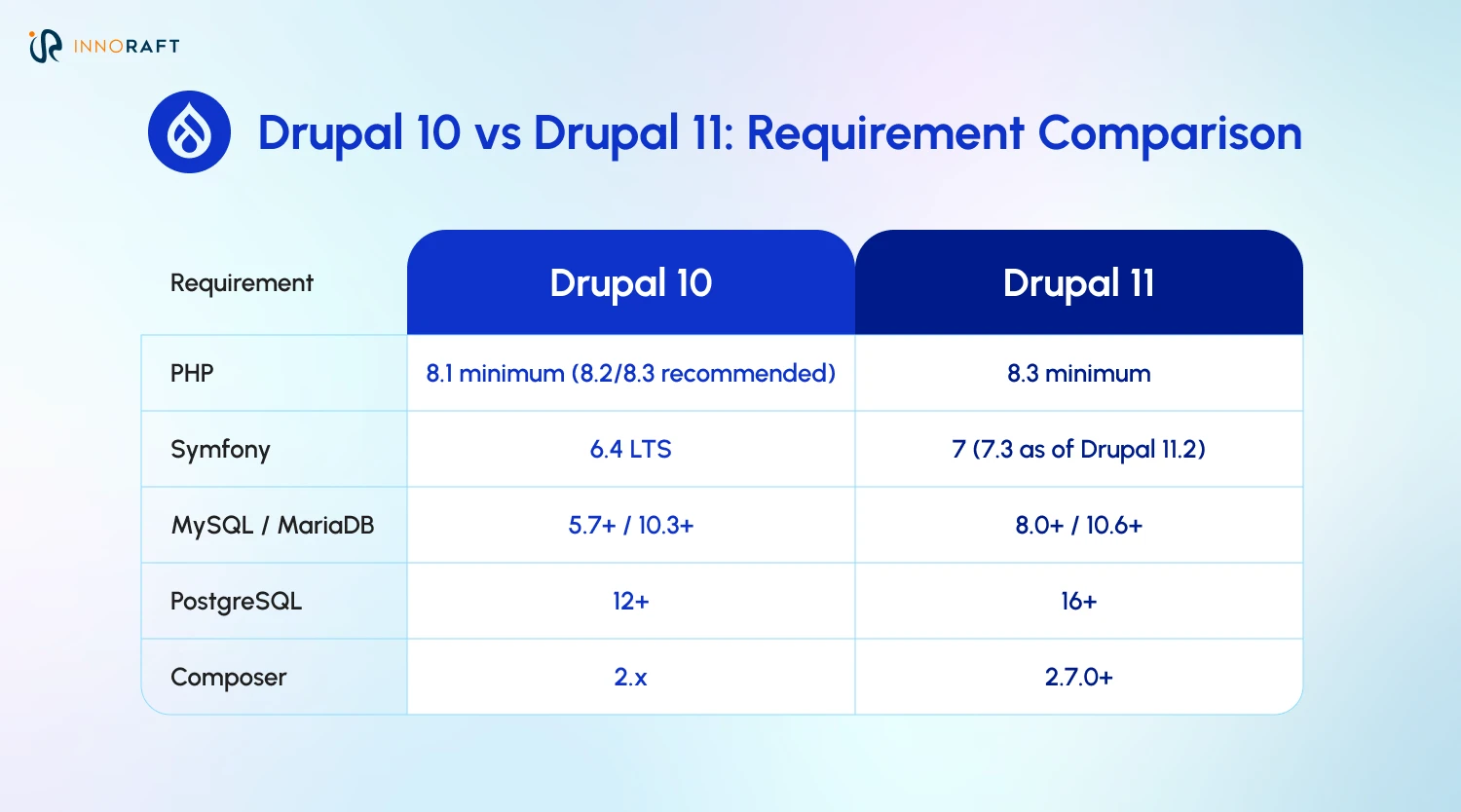
PHP 8.3 has remained the minimum through Drupal 11.4 (mid-2026); 11.1 and later minors recommend PHP 8.4 for optimal performance. Database minimums are unchanged since Drupal 11.0 and confirmed on Drupal.org's current system requirements documentation.
How does Drupal 11 Support Component-Driven, Headless Front-Ends?
Single Directory Components (SDC) are now a stable core Drupal 11 features. Additionally, core endpoints like JSON:API and the new Menu Linkset, along with robust contrib ecosystem tools like GraphQL, all make Drupal 11 a genuinely solid backend for React, Vue, or Angular front-ends, not a bolted-on afterthought.
What is a Single Directory Component, and Why does it Matter?
SIngle Directory Component is one of the most anticipated Drupal 11 benefits. Before SDC, a single UI component's HTML, CSS, and JavaScript could be scattered across three or four different theme folders. SDC groups everything a component needs- template, styles, scripts, and configuration- into one directory:
- Front-end teams can build and test components in isolation, closer to how Storybook-based workflows already operate.
- Updating a component ripples through every instance across the site automatically.
- Multisite enterprise deployments can share the same component library across properties instead of duplicating theme code.
How does Drupal 11 Handle Headless and API-First Delivery?
JSON:API ships in core and is mature enough that many teams treat this Drupal 11 upgrade purely as a content backend behind a decoupled front-end; GraphQL isn't part of core, but the contributed GraphQL module is robust and widely deployed for teams that prefer a query-based API. Worth knowing about: Menu Linkset, which standardizes how Drupal-managed navigation menus are exposed to JavaScript frameworks through a machine-readable format. It moved into core with Drupal 10.1 and continues in 11. Contributed modules could expose menu data before that, but Linkset gives teams a standard way to do it without extra dependencies.
Is Drupal 11 the Right Backend for a Single-Page Application?
For enterprises running omnichannel delivery, website, mobile app, kiosk, partner portal, off one content source, stable SDC plus robust API support, and Linkset-driven navigation makes a strong case for Drupal as the system of record, even when the rendering layer lives entirely outside Drupal 11 for enterprises.
How does Drupal 11 Improve Content Governance and Editorial Workflows?
The Workspaces module, Drupal's answer to content staging, actually reached stable status back in Drupal 10.3.0, and that stability carries forward unchanged into Drupal 11 features (10.3 and 11.0 share nearly identical core APIs by design). Recipes, which are newer, give teams a repeatable way to package configuration bundles across multiple properties, cutting down the manual setup that used to eat up sprint after sprint.
What Problem does Workspaces Solve?
Large content teams often need to stage a batch of interdependent changes- a campaign landing page, updated navigation, new taxonomy terms- and publish them together rather than one piece at a time. Workspaces let editors build all of that in an isolated environment, preview it as a whole, and push it live in one action, particularly useful for coordinated product launches or time-sensitive announcements where publishing half the changes early would look broken.
What are Drupal Recipes, and How do They Replace Install Profiles?
Recipes package a set of configuration such as content types, user roles, views, modules, into a reusable, shareable bundle. Instead of manually rebuilding "a standard blog setup" on every new site in a multisite deployment, a team applies the recipe once and gets the same result every time. Recipes shipped as experimental Drupal 11 features and matured through 11.1 and later, with batched module installs landing in 11.2 that made applying them noticeably faster.
What else changed for content editors with the Drupal 11 upgrade?
- An experimental, customizable left-aligned navigation toolbar replaced the old top admin bar.
- CKEditor 5 is now the only editor shipped in core; its markdown-style autoformatting shortcuts came in with Drupal 10's move to CKEditor 5 and work the same way in 11.
- Taxonomy terms became fully revisionable with a dedicated revision UI, and gained the ability to go through content moderation workflows the same way nodes do- both landed in Drupal 10.3.0, per Drupal.org's official change records, and continue unchanged in 11.
Industry perspective: Drupal's core initiatives coordinator has explained that Drupal 11 CMS was released earlier than the usual two-year cadence specifically to give organizations more runway to plan their upgrade; a sign that the project is thinking about enterprise migration timelines, not just feature velocity.
What Security and Maintenance Improvements does Drupal 11 Bring?
The Access Policy API moves permissions beyond simple roles into context-aware access control, while Project Browser and Automatic Updates, built on the now API-stable Package Manager, are steadily reducing how much manual babysitting a Drupal site needs.
How does the Access Policy API Change Enterprise Security?
Traditional role-based permissions answer "what can this role do?" The Access Policy API, introduced in Drupal 10.3, carried forward as Drupal 11 features, lets developers write policies that additionally answer "under what conditions?" Drupal's own documentation cites time of day as a stock example of the kind of signal a policy can key off, alongside things like domain or a user's field values; taxonomy- or field-based restrictions are a common pattern teams build on top of it rather than something pre-configured out of the box. Having that framework in core, instead of stitching together several contributed access-control modules, is a real upgrade from static role checks for enterprises building toward zero-trust architectures.
What is the Project Browser, and does it Improve Security?
Project Browser lets site builders search for and install modules directly from the Drupal 11 CMS admin interface, without touching Composer. Worth being precise here: it's a discovery and installation tool, not a security scanner. A module being listed doesn't mean it's been vetted for vulnerabilities. Its real value is in cutting the friction of finding the right module in the first place; teams should still run their own module audits as part of a security review.
Where do Automatic Updates Stand Today?
Package Manager, the foundational API both Project Browser and Automatic Updates rely on, became API-stable in Drupal 11.2. Automatic Updates (available today as a contributed add-on, with a path toward deeper core integration) can apply patch-level core updates in a sandboxed copy of a site and flag problems before they hit production, turning a manual, nerve-wracking process into something closer to a supervised, one-click action.
What is the Best Way to Migrate to Drupal 11?
Now that we have a look at what’s new in Drupal 11, you might be wondering about migration requirements. While an expert Drupal migration guide can help you, there are still some pre-requisite you must check off the list of migration. For example, if your site is already on Drupal 10.3 or later, moving to Drupal 11 is the smoothest major-version jump in the platform's history. There's no difficult data migration, just a dependency and compatibility check.
Here’s a quick checklist our experts at Innoraft suggest for your Drupal 11 migration.
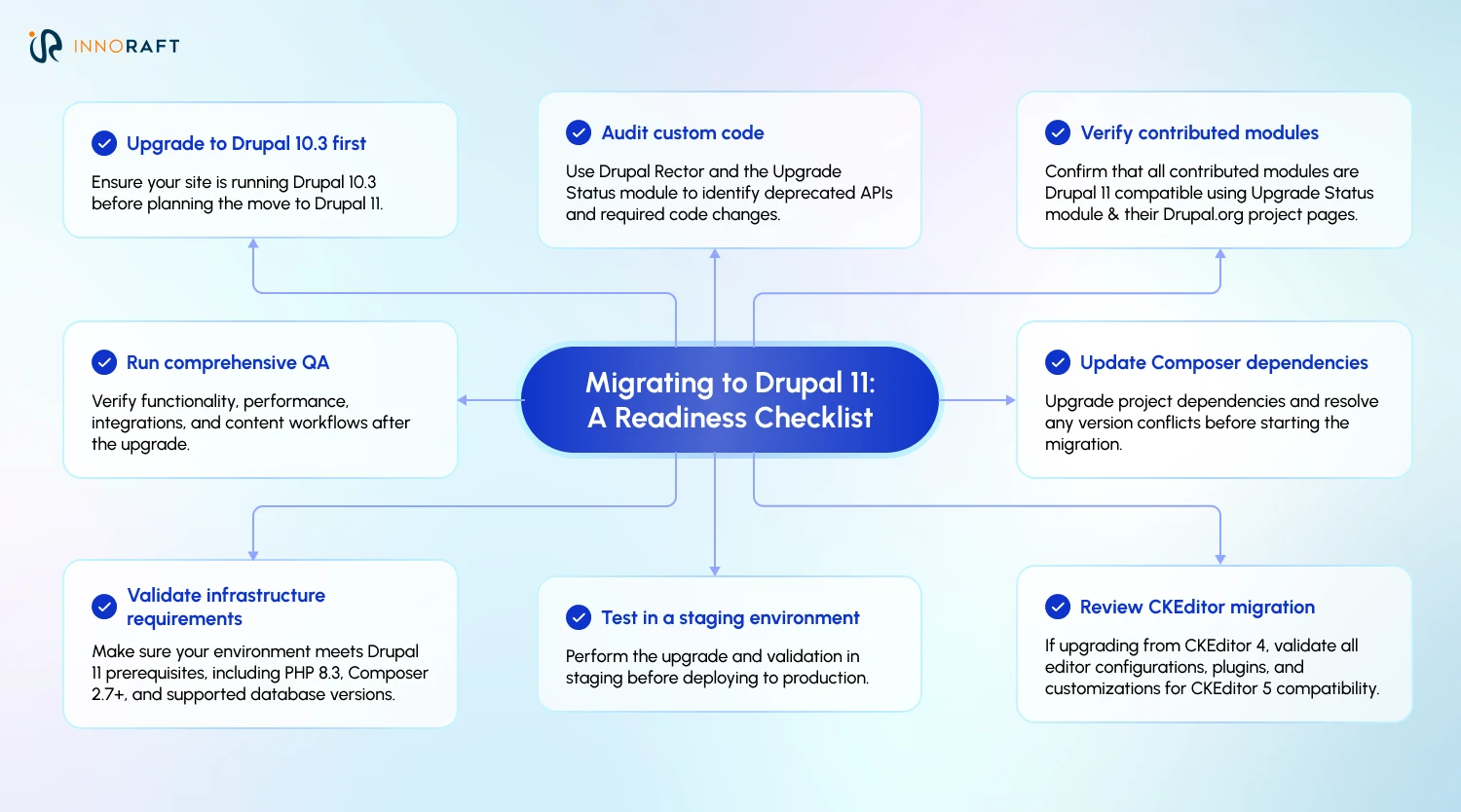
While there’s no need to jump the gun on the transition, it is still important that moving to Drupal 11 for enterprises becomes a part of future goals. Drupal 10 remains supported until Drupal 12 arrives, but its end-of-life date is now fixed at December 9, 2026. Drupal 12 itself has moved through several planning windows in 2026 and, per the most recent core release schedule, is targeted for the week of December 7, 2026, alongside Drupal 11.5. So treating Drupal 11 upgrade as a short-term stop rather than a target isn't realistic. Enterprises still on Drupal 10 have a defined runway, not an open-ended one.
For organizations without in-house Drupal expertise to run this audit, Partnering with an experience Drupal development company like Innoraft can help with handling enterprise migrations, decoupled builds, and long-term Drupal maintenance for global clients, can shorten the timeline and catch compatibility issues before they become production incidents.
Is Drupal 11 Worth the Upgrade for Your Enterprise?
Drupal 11 for enterprises is leaner, faster, and built around how modern teams already work, component-driven front-ends, API-first delivery, and content governance that doesn't require a developer for every staged change. None of that happens automatically, though. Technical leaders should audit current infrastructure against the new PHP and Symfony baselines, run deprecation checks through CI/CD now rather than at the last minute, and map out the upgrade cycle before the Drupal 10 end-of-life date narrows the runway. Whether that work happens in-house or with a partner, the sooner the audit starts, the smoother the migration ends up being.
Ready to take your business platform to the next level with Drupal 11? Connect with our experts today!
FAQ
Frequently Asked Questions
Didn’t find what you were looking for here?