4 Nov, 2026
Hybrid Apps in 2027: Why They’re Still Relevant


Every company that wants a mobile app hits the same fork early- build native for iOS and Android and pay for two codebases? Or choose one platform and hand the other half of the market to a competitor. Hybrid mobile apps exists to remove this fork, and does the job better than most people expect.
Over the years, the frameworks have matured. Flutter and React Native render smoothly and reach the camera, GPS, and Biometrics without much friction. A shared codebase can reduce duplicated implementation and maintenance work. While Native is still the right call for some apps, hybrid apps can be the answer to many of your app development challenges.
In the following guide, we will discuss why even in the coming 2027, Hybrid apps can be the right choice, and how you can build a successful app.
What Is Hybrid App Development and How Does It Work?
Hybrid app development in 2027, also known as cross-platform mobile development, means building one codebase that runs on both iOS and Android. The term covers WebView-based hybrid apps, native-rendered frameworks such as React Native, and frameworks with their own renderer such as Flutter.
| Approach | How it works | Examples | Best suited for |
| WebView hybrid | A web app (HTML, CSS, JavaScript) runs inside a native container | Ionic with Capacitor, Apache Cordova | Content apps, internal tools, teams with strong web skills |
| Native-rendered cross-platform | JavaScript or TypeScript application code uses React Native’s architecture to create and update native platform UI components | React Native | Consumer apps, teams already fluent in React |
| Own-renderer cross-platform | The framework renders its own widget-based UI through its own engine instead of relying primarily on native platform controls | Flutter | Brand-heavy interfaces, apps that also target web and desktop |
| Shared logic, native UI | Business logic is written once in Kotlin. Screens are commonly built natively, or shared through Compose Multiplatform | Kotlin Multiplatform, Compose Multiplatform | Teams that want fully native screens, or shared UI on a Kotlin stack |
| .NET cross-platform | C# and XAML cross-platform controls map to native platform controls where applicable, so behavior can differ by platform | .NET MAUI | Organisations already on Microsoft tooling |
Strictly speaking, hybrid began with WebView apps. React Native uses native platform UI components, and Flutter renders its own widget-based UI through its own engine. Neither is simply a web app in a WebView. Most buyers group them together, so this guide does too, with cross-platform app development as the umbrella term. The table shows how the main options differ.
Why Are Hybrid Apps Still Relevant in 2027?
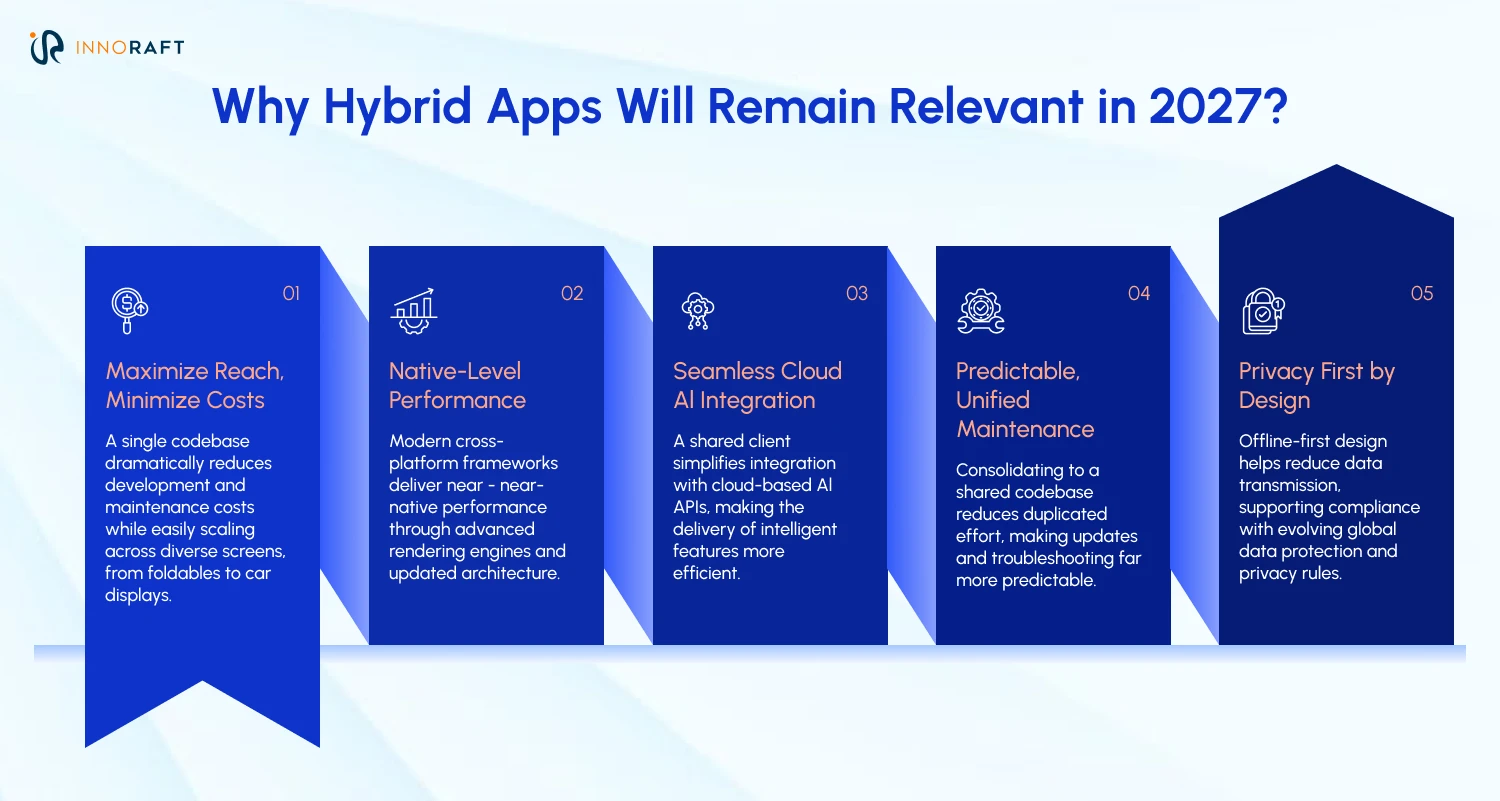
Hybrid mobile apps stay relevant because the cost-versus-performance trade-off still favors shared codebases for most business apps. Native can be preferable when a product depends on highly specialized hardware integration, demanding real-time processing or immediate access to new platform APIs. For many other apps, cross-platform offers a practical balance of cost, speed and performance.
Surveys point the same way. A survey of 30,000 respondents, found 46% using Flutter and 35% using React Native in 2023. The 2024 Stack Overflow survey data in the same report shows those two frameworks have more users than every other cross-platform option combined among roughly 6,500 respondents.
1. How Does Hybrid Cut Cost And Cover More Screens?
A single codebase can shorten time to market and reduce development and maintenance costs. That suits MVPs and internal enterprise tools. Screens have also multiplied. Foldables, tablets, desktops and car displays all need their own layouts, and hybrid app development frameworks like Flutter add web and desktop targets to the same codebase. Toyota has a Flutter showcase entry for in-vehicle displays. Writing separate layouts for every device type gets expensive fast.
2. Has Performance Caught Up With Native?
For many business and consumer apps, modern cross-platform app development frameworks can deliver performance comparable to native. Results depend on workload, rendering demands, device capabilities and implementation quality, and graphics-intensive or latency-sensitive work may still benefit from native code. Two engineering changes helped. Flutter’s Impeller engine is now the only renderer on iOS and the default on Android 10 and above (API 29), according to the Flutter documentation. React Native’s New Architecture became the default in version 0.76 and the only option from 0.82 in October 2025, as the React Native team announced. That replaces the legacy bridge-based communication model with JSI, TurboModules and Fabric. Asynchronous work still exists in mobile apps, so the change removes one source of overhead without eliminating bottlenecks. Neither change guarantees native-equivalent performance, and Impeller cannot fix expensive layouts, excessive rebuilds, memory pressure, networking or CPU-heavy work. Profile before you optimize.
3. Does Cloud-Based AI Favor Hybrid Apps?
Not inherently, but it can help. Many apps call cloud APIs for language models, so the phone mostly sends requests and renders results. A shared client can simplify that integration cross-platform app development , though network performance and backend design still matter. Apple’s on-device Foundation Models reach Flutter and React Native through community-maintained plugins, and both linked packages currently support iOS only and need iOS 26. Verify each plugin’s maintenance status and supported framework versions before depending on it.
4. Why Is Maintenance More Predictable?
A shared codebase of cross-platform app development can reduce duplicated implementation and maintenance work. Google Pay’s consolidation shows the scale at which that works. Teams still need platform-specific testing for permissions, lifecycle behavior, accessibility, device compatibility and native integrations.
5. Why Does Local-First Design Matter Under New Privacy Rules?
Because offline-first architecture used by hybrid apps can help reduce unnecessary data transmission and can support data minimization. However, it cannot guarantee compliance. Check what obligations apply to your processing and timeframe based on your location and target audience and ensure personal data stored locally is properly protected.
What Are the Core Hybrid App Development Challenges and How Do You Solve Them?
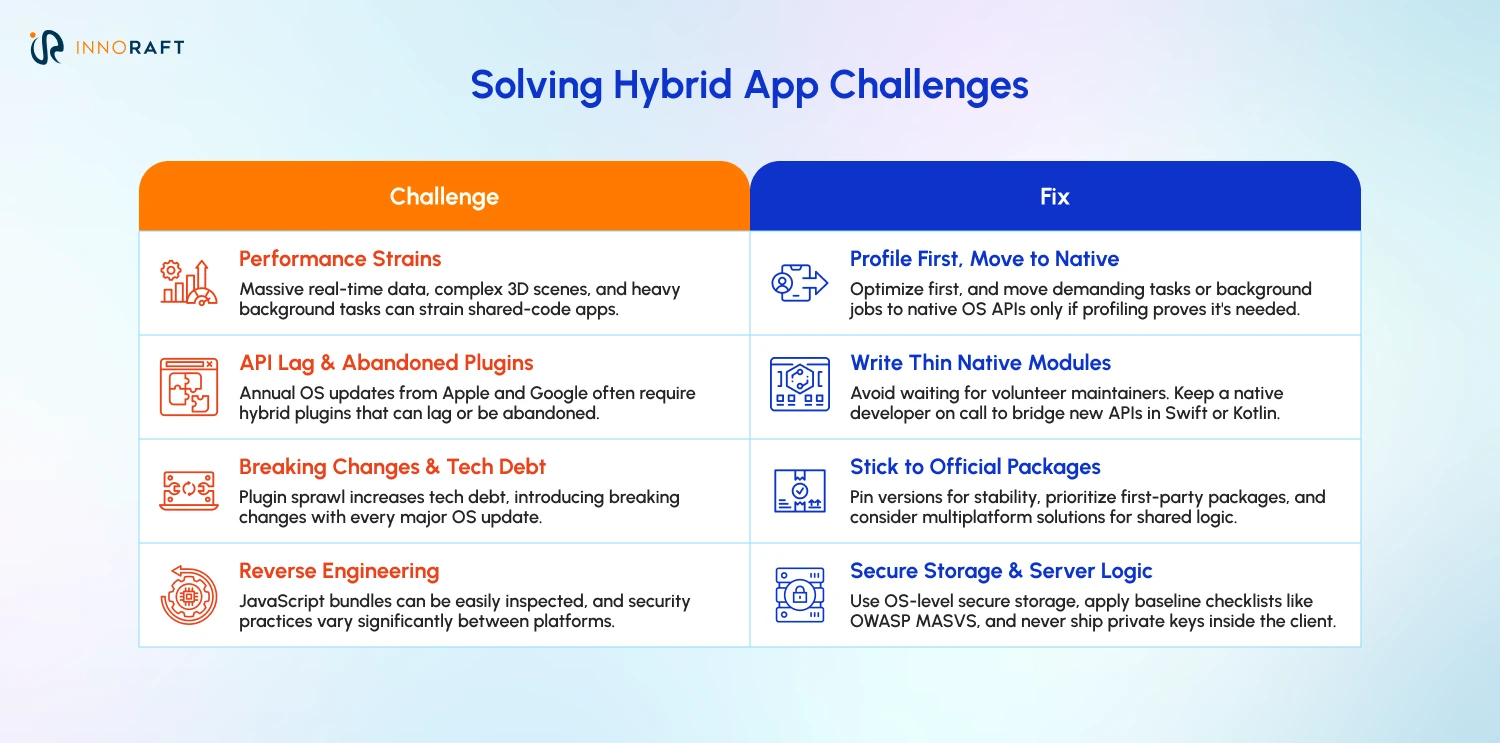
Despite the benefits of hybrid apps, four problems show up most often. These are heavy workloads, late access to new OS features, plugin risk and a wider security surface. Each one has a practical fix.
1. How Do You Handle Heavy Graphics And Background Work?
Challenge: Massive real-time data streams and complex 3D scenes can still strain hybrid mobile apps. Long background jobs add pressure too, and iOS and Android background-work restrictions still apply.
Fix: Profile the app on representative physical devices before optimizing. Fix inefficient rendering, excessive memory use and expensive computation first. If profiling shows it will help, move work to native modules or suitable background mechanisms. Treat long-running background tasks separately, using each OS’s supported background APIs. For demanding 3D games or similar graphics-intensive applications, evaluate hybrid vs native app development based on your actual performance requirements.
2. What If A New OS Feature Is Not Available Yet?
Challenge: Apple and Google ship new APIs every year. Hybrid app development frameworks reach them through plugins, and plugins can lag or get abandoned.
Fix: Write a thin native module in Swift or Kotlin for the missing piece. Keep a native developer on the team, or on call through a partner, so you never wait on a volunteer maintainer.
3. How Do You Control Dependency Risk And Technical Debt?
Challenge: Plugin sprawl brings breaking changes with every OS update and pushes maintenance costs up.
Fix: Stick with first-party packages where you can and pin versions for reproducible builds. Pinning won’t remove vulnerabilities, so schedule regular updates and security reviews too. If fragile UI abstractions in cross-platform app development worry you, look at Kotlin Multiplatform. Google announced official Android support for it in May 2024, and Google Docs already uses it for shared business logic, per the Android Developers Blog. Teams can keep native screens on top of that shared logic or share the UI through Compose Multiplatform.
4. How Do You Secure A Hybrid App?
Challenge: Anyone can often open up a JavaScript bundle in hybrid mobile apps and read it with little effort. Certificate pinning and runtime protection also behave differently on iOS and Android.
Fix: Use the OWASP MASVS as your baseline checklist, and apply the controls your threat model justifies. Use iOS Keychain and Android secure storage for credentials, and platform key management such as Android Keystore for cryptographic keys. Obfuscating release builds raises the effort of reverse engineering, but secrets, private keys and authoritative business rules should never ship inside the client. Enforce sensitive authorization on trusted servers, and add certificate pinning only where the threat model justifies it.
What Is the Best Way to Build a Hybrid App in 2027?
Keep business logic apart from the UI, wrap your plugins, test on real low-end phones and automate security checks. These practices help teams maximize the benefits of hybrid apps while addressing common development and security challenges.
1. How To Structure Your Code?
- Separate business logic from the UI with Clean Architecture, BLoC or Redux, so modules stay independent as the app grows.
- Lock plugin versions and skip packages you do not need.
- Keep build-time configuration and signing credentials out of source control and in a secrets-management system. For hybrid app development in 2027, secure credential management is essential to prevent sensitive information from being exposed in distributed application builds.
2. How To Speed Up Performance?
- Profile CPU-intensive tasks, then move them to a worker, isolate or native module, depending on the framework and workload. This flexibility is an important consideration in hybrid vs native app development, particularly when optimizing performance. Minimize data transfers between runtimes and keep UI-thread work short by applying proven hybrid app performance optimization techniques. Use the OS’s supported background APIs for scheduled or long-running tasks.
- Cache data that isn’t sensitive when it saves network calls. For anything sensitive, first decide whether it needs to live on the device at all. If it does, encrypt it, restrict who can read it, and set rules for how long it stays and when it gets deleted. Store credentials and cryptographic keys in suitable platform-backed mechanisms.
- Keep view trees shallow.
- Lazy-load long lists and use optimized image formats.
3. How To Manage Plugins And The Native Layer?
- Audit plugins every quarter, review them for security issues, update them regularly and drop anything unmaintained.
- Wrap each plugin in a service class. If it breaks or gets deprecated, you fix one file instead of hunting through the whole codebase.
4. How To Design A UI That Feels Native?
- Follow Apple’s Human Interface Guidelines and Google’s Material Design, and use adaptive styling so toggles, buttons and navigation match platform habits.
- Design loading states, skeleton screens and fallback pages for dropped connections.
5. How To Protect User Data?
- Minify and obfuscate release bundles in hybrid mobile apps to raise the effort needed for reverse engineering. Compiled native apps can be reverse-engineered too, so keep secrets out of the client.
- Never keep tokens or credentials in plain-text local storage. Store credentials in iOS Keychain or Android secure storage, and protect cryptographic keys with platform key management.
- Pin trusted server certificates only where your threat model justifies it, with backup pins, a rotation plan and a recovery plan. Pinning supplements normal TLS validation.
6. How To Test And Ship With CI/CD?
Build a mobile-specific pipeline that runs tests on every commit.
Sign automatically through a secure CI/CD process with restricted credential access.
Distribute builds to TestFlight and Google Play’s internal testing track.
Test hybrid mobile apps on low-end and mid-range physical phones before each release. Emulators miss battery drain, thermal throttling and real network swings. Also cover accessibility, screen sizes, OS versions and store release requirements, following established UX best practices for hybrid app development.
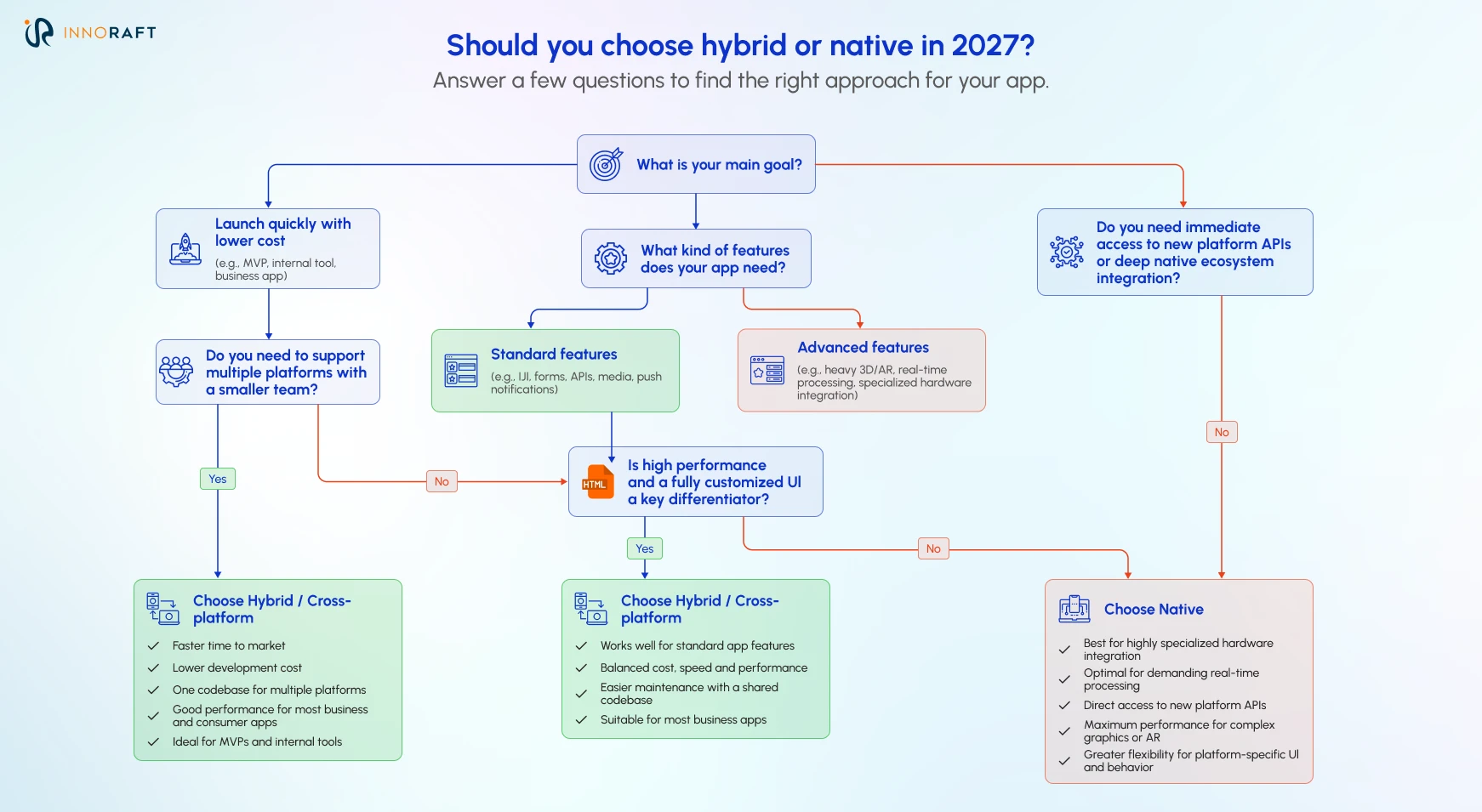
So, Should You Choose Hybrid or Native in 2027?
Choose hybrid when speed, budget and shared features matter most. Choose native when the product depends on highly specialized hardware or day-one platform APIs.
How Do You Pick Between React Native, Flutter And Kotlin Multiplatform?
Match the hybrid app development frameworks to your team first. React Native suits JavaScript and React teams. Flutter suits teams that want one custom interface across mobile, web and desktop. Kotlin Multiplatform suits Android-first teams that want native screens. Build a two-week prototype of your hardest screen before you commit. Treat these as starting points rather than universal rules. Team experience, required integrations, platform coverage and long-term maintenance matter too.
| Framework | Language | Best when | Watch for |
| React Native | JavaScript or TypeScript | Your team already knows React and wants a native look | Plugin quality varies, and projects must run on the New Architecture |
| Flutter | Dart | You want a custom brand interface across mobile, web and desktop | Smaller Dart talent pool in some markets |
| Kotlin Multiplatform | Kotlin | You want shared logic with fully native screens | Two UI codebases to maintain |
Conclusion
Hybrid app development has never really been a compromise, and as the frameworks improve, hybrid vs native app development is becoming a more context-dependent decision, with hybrid proving to be a better choice in some specific use cases. For most business apps, it can be a sensible starting point with native modules covering the gaps. Pick the framework that works best with your requirements, wrap your plugins, and test on real devices to make sure that your hybrid app performs smoothly and gives the user a fast, smooth, and secure user experience.
Want expert help on your Hybrid app development project? Contact our experienced developers today!
FAQ
Frequently Asked Questions
Didn’t find what you were looking for here?