8 Apr, 2026
AI in Web Development: Complete Guide to Smart & Scalable Websites (2026)


The web has fundamentally changed.
A decade ago, modern web development meant responsive layouts, fast load times, and clean code. Today, it means building systems that think; websites that adapt to users, optimize themselves, and generate content in real time.
Artificial intelligence is driving this shift. Not as a plugin or add-on, but as a fundamental layer in how modern web systems are designed, built, and maintained.
The shift to AI-powered web development has improved web development so much that a recent developer study revealed that 76% of developers use or want to try AI. Another GitHub study found that 57% developers are of the opinion that AI tools are significantly helping them improve their coding language skills. With these statistics and the already visible positive impact of AI in web development one thing is becoming more evident- the AI revolution in web development is being well-embraced by the industry, and non-compliance will only leave your business behind the competition.
A. But Why does AI in Web Development Matter?
The ROI of using AI in web development is already quantifiable. McKinsey's 2023 report estimated that generative AI could deliver $2.6 to $4.4 trillion in annual value across industries globally. Within development teams specifically, there’s a possibility of significant productivity gains in code documentation, generation, and review tasks when AI tools for developers were in active use.
Beyond developer productivity, AI changes the economics of the entire web development lifecycle in three distinct ways.
How AI Reduces Web Development Time-to-Market
Using Artificial intelligence in website development effectively compresses every phase of the SDLC.
- AI-driven code generation handles boilerplate codes.
- Automated CI/CD can catch any regressions before staging.
- AI-enabled prototyping tools can turn stakeholder requirements into interactive mockups easily,without full design sprint.
In short, using AI agents for business productivity, you can effectively reduce the web development timeline from months to week, with the right team and processes.
Lower Defect Rates Through Intelligent Review
AI-integrated code review tools analyse pull requests for common vulnerability patterns, performance anti-patterns, and logic inconsistencies before production. This is a necessary precaution for businesses, because the more AI tools for web development are used during development, the more important it becomes to leverage AI-driven testing to detect the new vulnerabilities it might introduce.
Higher-Converting User Experiences
Personalized web experiences convert better, and the data is unambiguous. Research shows that 71% of consumers expect personalized experiences from companies and 76% get frustrated when personalization is lacking. Using AI for scalable websites makes that personalization possible at scale, across millions of sessions simultaneously, and that scale translates directly into measurable revenue.
B. How to Build a Smart Website: Core Applications of AI in Web Development
Let’s look at the most impactful areas where AI is actively reshaping web development today.
How AI is Changing Front-end UX?
For years, responsive design was the industry gold standard - build once, adapt to screen size, the end. But that era is ending. The new standard is smart website development with AI-powered UX that moves from responsive to predictive, where the interface adapts not to a device, but to the individual user's intent, behavior, and context.
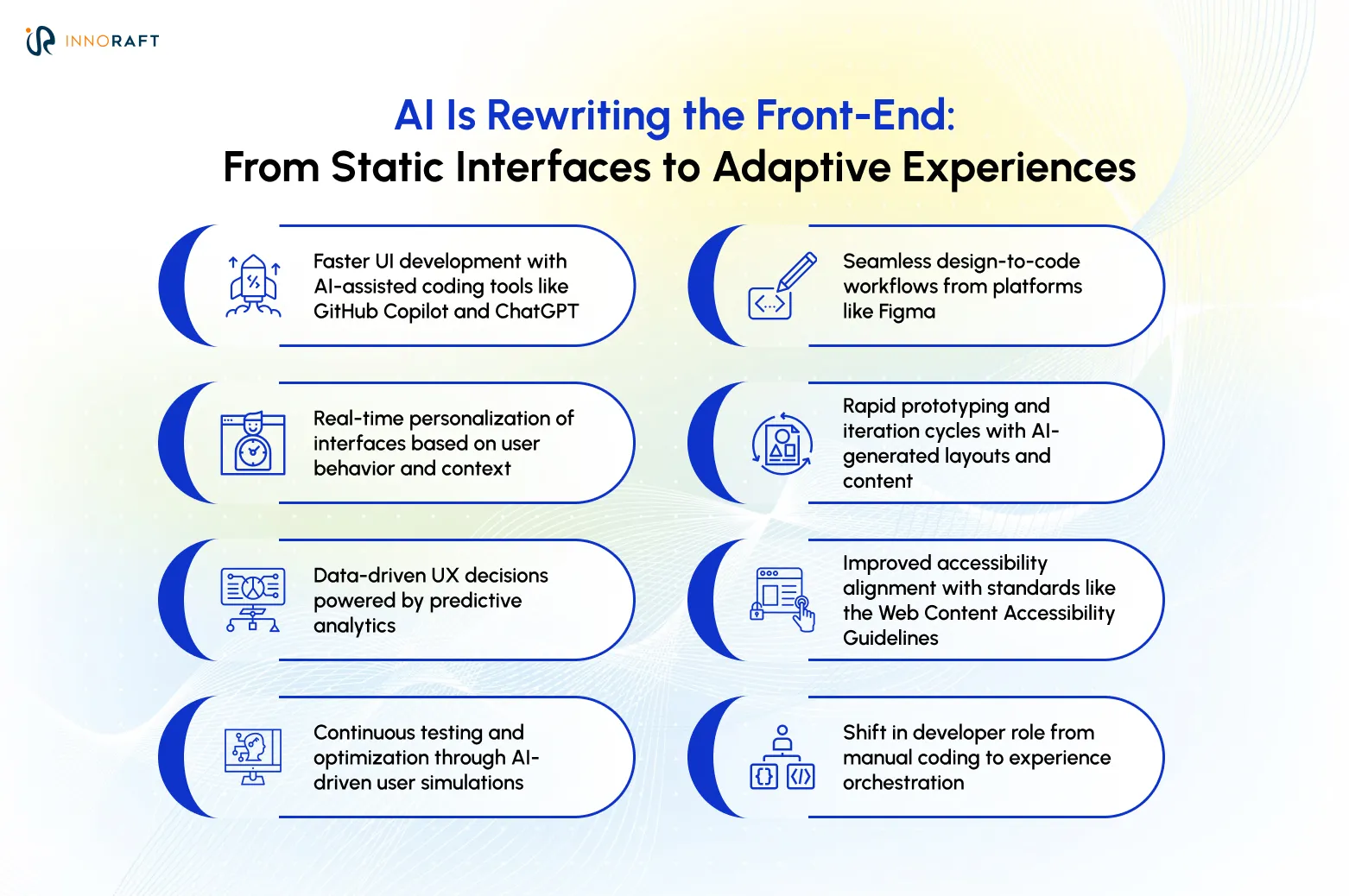
Predictive UX works by continuously analysing real-time signals: scroll depth, hover patterns, session history, time-on-page, geographic context, entry source, and inferred intent. Algorithms analyze these cues to adjust layouts, content structures, and CTAs without user prompts. In practice, it looks like the following:
- A business (SaaS) site bumping up pricing details for users who are familiar with the features already.
- An online shop reordering product photos to lead with the angle that usually closes the sale.
- A news platform that reorders its content modules based on each reader's inferred interest clusters, not just their stated preferences.
Airbnb has used ML-driven UI adaptation for years. Google's Material You design system introduced dynamic theming based on device and user context. Building AI-driven web applications is no longer enterprise-only capabilities; a partnership with AI-forward web development services can bring this capability within reach of teams at any scale.
How does AI-Driven Personalization Work at Scale?
AI-powered web development applies real-time ML inference to deliver entirely distinct content experiences to different user segments defined by behavioral signals rather than static profile data.
The architecture works like this: a user lands on your website. Within a few seconds, an ML model processes their session data, assigns them to a dynamic behavioral segment, and retrieves the appropriate content variant from your CMS or personalization layer. The result: a tailored page experience that answers user’s questions proactively.
Netflix is the canonical example. Their internal engineering blog documented how they personalize specific thumbnail artwork shown for each title along with content recommendations. The result was a measurable increase in engagement. The same AI-driven personalization principle applies to web product pages, landing page hero images, and blog article grids.
How have AI Chatbots and Conversational Interfaces Evolved?
Early chatbots operated on decision trees: rigid, brittle, and frustrating the moment a user phrased a question in an unexpected way. Modern LLM-based interfaces in AI-driven web applications understand multi-turn context, interpret intent from natural language, handle follow-up questions naturally, and escalate to human agents with the full conversation context intact, so the user never has to repeat themselves.
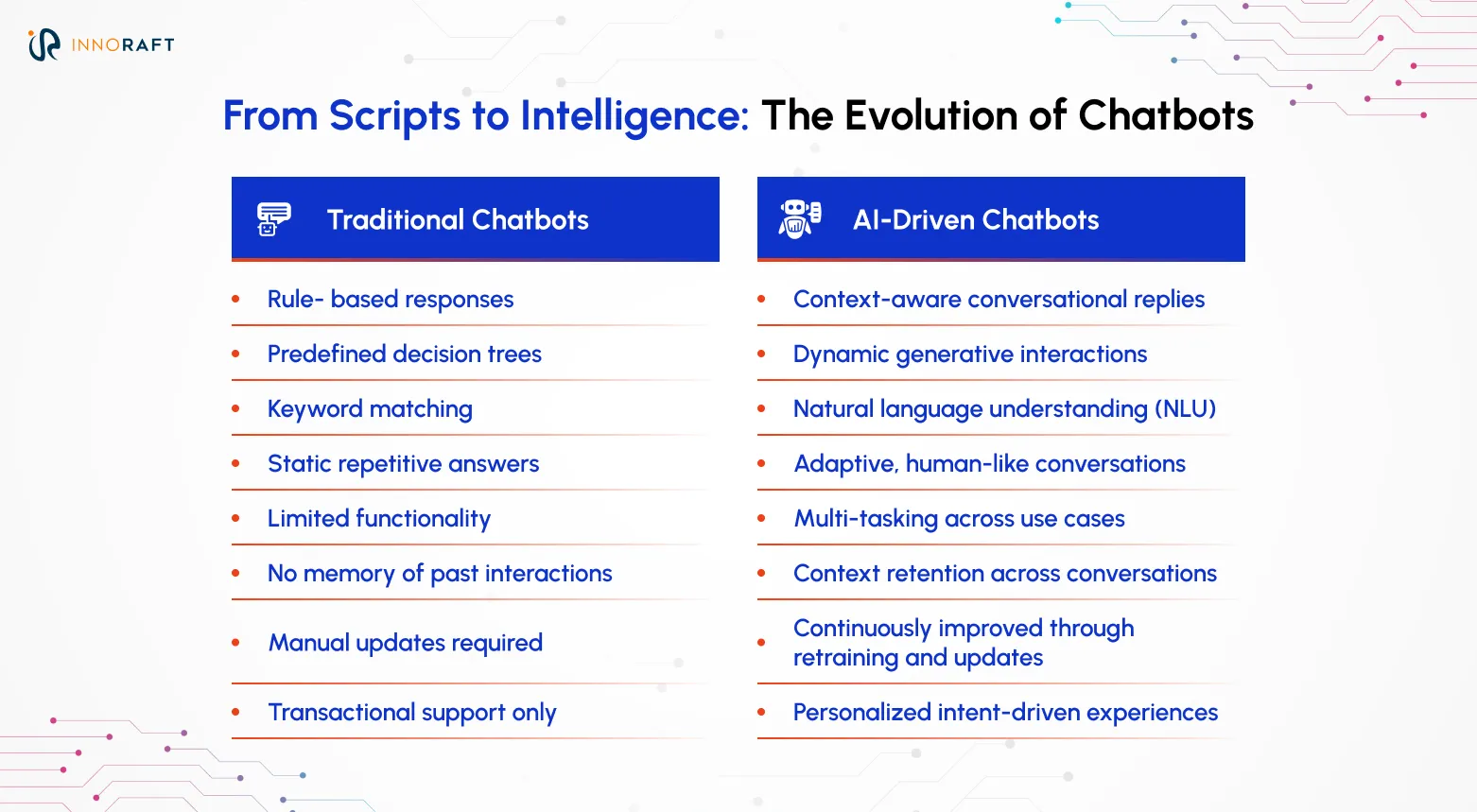
More importantly, when backend integrations are configured right, conversational interfaces can also perform transactions. For example, a user can make a complex request, like, how they want to change their monthly plan to annual billing. The interface handles the process, and completes the request reducing the number of support tickets for the web team.
What is the Role of AI in Enterprise CMS Development?
With AI agents for content creation and management, businesses can use NLP (Natural Language Processing) classifiers to streamline tasks like content tagging, metadata generation, related content module update, and editorial queues.
Content management is perhaps the most underappreciated segment in terms of AI-powered web development. For larger marketing teams or digital publications, tagging every content, writing meta description, choosing related content, assigning content types and schedule publication can take up a significant amount of time and resources. These tasks mostly require time, and not editorial judgement. That's exactly why using AI can help streamline these tasks.
CMS' like Drupal is emerging as strong options for headless AI integration. Especially in a decoupled architecture, it is much more straightforward to deploy AI tools for web development between content repository and the frontend delivery layer. This approach opens the door to faster innovation, scalability, and seamless integration of intelligent experiences without disrupting existing systems.You can effortlessly serve LLM-generated article summaries, AI-curated related content modules, and real-time personalization feeds without replacing your entire content infrastructure.
How does AI-assisted Back-end Optimization work?
Nobody enjoys digging through endless logs to find a memory leak or figure out why a database is failing. Because of that, a lot of dev teams are starting to lean heavily on Artificial intelligence in website development and deployment to handle the tedious stuff. However, the back-end isn't magically rewriting its own code just yet. Instead, machine learning models are constantly sorting through server metrics and query logs in the background. They're improving at spotting weird patterns long before a system actually crashes.
A modern setup based on AI for scalable websites can easily recommend optimizing a specific database index, or notice a traffic spike in the future and adjust your scaling. It essentially removes the worst parts of performance tuning. Instead of waiting for things to break and playing detective, you get the exact problem, and usually a solid suggestion on how to fix it, handed right to you.
What is a Data Backed CI/CD pipeline?
AI in Web Development has definitely made deployment pipelines a lot sharper. Here’s how modern CI/CD setups work now:
- Modern CI/CD systems analyze historical deployment data
- They detect similarities between current commits and past failures
- Risky commits are flagged early in the pipeline
- Flaky tests are identified before they merge
- Teams use risk scores to guide automated deployments
- High-risk changes can trigger slow canary releases
- Pipelines can pause or alert teams when issues are detected
- Especially useful for fragile or performance-sensitive components
Though AI-powered web development, deployment and CI/CD pipeline is a largely human-driven field, having these data-driven safety nets helps to enhance the overall process and reduce any manual error.
How Does AI Improve Website Performance and Speed?
Website speed affects not only the technical performance, but revenue as well. Google's Core Web Vitals data suggests that faster loading times directly increase user conversions. Even a 0.1-second improvement in mobile load time can significantly increase conversions for business sites.
Using AI for website performance improves site speed in a few different ways:
- Predictive caching studies behavior to guess the next page a visitor wants, loading it before they even click.
- Edge AI ensures inference happens at CDN nodes closest to where the user is, so personalization requests are resolved in milliseconds. The result is personalized content that feels instant rather than loaded.
- Image optimization uses ML pipelines to make the call on what kind of image to load based on every device, network conditions and request.
AI in QA and Maintenance: Shifting Left with Intelligence
Quality Analysis (QA) has always been that part of the development cycle that slows everything down, crammed into the final stretch before release, expensive to do properly, and almost entirely dependent on people catching things manually. That's starting to change. AI in Web Development is pushing quality checks earlier in the process, which means fewer surprises down the line and less time spent resolving bugs.
Here’s 3 points where we are observing significant impact of AI implementations
AI Impact on QA and Maintenance | |||
| AI QA Strategy | Traditional Approach | AI-Driven Approach | Key Impact |
| Visual Regression | Manual checking across browsers and devices. | Computer vision flags visual UI shifts instantly. | Cuts long manual QA down to a faster pipeline check. |
| Self-Healing Tests | Tests break when UI selectors change; require manual code fixes. | Tools locate elements visually and contextually, adapting on the fly. | Eliminates brittle tests and constant maintenance overhead. |
| Intelligent Logging | Reactive, manual log hunting after a crash. | ML monitors real-time logs for pre-failure anomaly patterns. | Triggers proactive alerts before the failure impacts users. |
C. How can you Start Implementing AI in Web Development?
At Innoraft, our experts believe that AI-driven web applications development is only beneficial when it is done right. That's why we follow an agile step by step approach which is backed by industry best practices- all to ensure that the AI integrated website delivers the right results.
Here’s an exclusive look at the process and best practices for you-
Step 1: Audit Your Existing Stack and Data Posture
Before anything else, get a clear picture of what you're actually working with, your architecture, your data sources, where the bottlenecks are, and which tasks eat the most developer time for the least return. Artificial intelligence in website development performs best with abundant, clean, structured data. Any poorly tagged content, incomplete analytics, or fixing undocumented codebase needs to be fixed first. Weak data infrastructure is the single most common reason AI pilots fail.
Step 2: Define Goals Tied to Specific Business Metrics
Vague AI goals fail. Specific ones succeed. Instead of "improve UX with AI," define "reduce average support conversation length by 30% using an LLM-powered chatbot by Q3, measured against our current Intercom baseline." Each AI-powered web development goal must map to a critical business KPI that impacts your bottomline.
Step 3: Choose between Buying via API vs. Build Custom
For the majority of web teams gearing for Smart website development with AI, using a commercial AI API (OpenAI, Google Vertex AI, AWS Bedrock, or Anthropic) is the right starting point. These give you access to state-of-the-art models without training infrastructure, and they cover most of the common web AI use cases. Custom model development, training your own LLM or fine-tuned ML model on proprietary data, is only warranted when you have a genuine proprietary data advantage and off-the-shelf solutions have demonstrably failed your requirements.
Step 4: Run a Time-Boxed, Measurable Pilot
Choose one high-value, low-risk feature to ship first: AI-powered site search, a support chatbot, or automated content tagging are all proven starting points. Constrain the pilot to 4–8 weeks. Define your success metric before you begin, not after. Use the results, whether positive or negative, to calibrate your broader AI investment.
Step 5: Scaling, with Oversight
As you integrate AI capabilities into your website, operational governance is essential. These governance must include:
- Data privacy review process for any user data passed through external AI APIs.
- Model monitoring pipeline that will detect output quality drift over time.
- A prompt versioning system
- And a review process with human-in-the-loop.
Bonus: Best Practices Checklist for AI-Driven Web Development
Here’s a best practice checklist from Innoraft’s developers to ensure security and drive success for your AI web development initiative:
- Data privacy: Ensure data privacy compliance (GDPR, CCPA, regional laws), review privacy policies and obtain required user consent before passing data through AI APIs.
- Accessibility: Ensure compliance with WCAG 2.2 standards, automate accessibility testing, prevent accessibility regressions before deployment, implement human review for high-stakes AI outputs, review medical, legal, pricing, and critical user-facing content, use AI as a first draft tool, not a final decision-maker.
- Version control: Version-control all prompts and examples, treat prompts as application logic, include prompts in pull request reviews, test prompts against regression datasets, monitor and prevent prompt drift.
D. The Pragmatic View: Challenges and Limitations
Despite the benefits of AI in web development, the use of artificial intelligence in business process comes with new risks. That is why our experts at Innoraft believe understanding the new challenges is crucial to resolve them proactively.
The "Black Box" Problem and Debugging AI-Generated Code
A Stanford report found that developers using AI tools for web development were statistically more likely to introduce security vulnerabilities than those writing code manually, not because the AI was malicious, but because AI-generated code creates a false sense of completeness and correctness that reduces the scrutiny developers apply to it. That is why every AI generated code block should be treated like pull requests made by junior developers and must pass human review.
Security Concerns: Prompt Injection and Data Leakage
Despite all the benefits, LLM powered features can introduce new attack surfaces, such as prompt injection. In this case, a malicious user can craft an input that overrides the AI system instruction, transforming a helpful customer interface into liability. Additionally, AI models can pick up malicious patterns from their training data or prior session context if output sanitization is insufficient. That is why input validation, output filtering, strict rate limiting, and continuous abuse monitoring must be treated as baseline requirements for AI-powered web development.
The Cost of API Calls and Computational Overhead
Even though API first development is the standard currently, the costs can compound rapidly during production. A real-time personalization engine making two million daily inference calls to a commercial LLM API can be significantly expensive, depending on token volume and model selection. Teams that select large general-purpose LLMs for narrow, repeatable tasks, waste important financial resources. Design for cost-efficiency from the architecture phase: implement aggressive caching for repeated inference patterns, use smaller models for bounded tasks, and monitor token expenditure with the same rigor you apply to cloud infrastructure costs.
E. Looking Ahead: The Future of AI-Driven Web Development
The industry is quickly moving past the era of simple AI coding assistants. We are heading toward true autonomous collaboration, where developers can hand off high-level project goals and the AI directly delivers code that is ready to deploy. Three trends are defining what the next three to five years of smart website development with AI will look like.
The Evolution of the Web Developer Role
Writing code just isn't enough anymore. The developers who actually stand out are combining hardcore engineering roots with entirely new capabilities using AI tools for web development. They know prompt design. They understand machine learning architecture and practical AI governance. The ability to evaluate AI output quality, architect systems that incorporate AI reliably, and understand where model limitations create product risk will matter significantly more.
Autonomous Agents
This ongoing transition is gaining serious momentum thanks to autonomous agents. Platforms like Cognition AI's Devin, OpenAI's latest agent frameworks, and Anthropic’s Claude-based agents and connectors prove these models can make it easier to implement Artificial intelligence in website development, managing complex, high-level objectives independently. Naturally, this shift is completely redefining what a modern developer's daily workload truly entails.
Web 3.0 and AI Convergence
Decentralized identity and data ownership models (core Web3 concepts) combined with AI-driven web applications personalization could enable a new class of web experience: simultaneously personalized and privacy-preserving. A user who controls their own portable data profile could consent to share specific signals with a personalization model, without that data ever residing on your server, and without surrendering ownership.
F. Conclusion
AI in web development is no longer a future-state ambition, it is a present-tense competitive advantage. Organisations that treat AI as a strategic layer of their web infrastructure are shipping faster, converting better, and operating leaner than those that do not.
The path to a genuinely intelligent AI-powered web development is all about making deliberate, sequenced choices: starting where the ROI is clearest, governing AI outputs with the same rigor you apply to any production system, and scaling investment proportionally to validated results.
Ready to boost your web development initiative with AI implementation? Talk to our experts and get started today!
FAQ
Frequently Asked Questions
Didn’t find what you were looking for here?